
Want faster client trust and fewer status calls this month? Here are eight examples that work immediately: send a scheduled visual status email with photos instead of a paragraph of jargon, record a 2-minute Loom-style video instead of a 500-word email, acknowledge every request within an hour with a clear ETA, replace open-ended questions with two-option decision prompts, publish a weekly one-page status instead of scattered updates, flag problems before the client notices them and pair the flag with a plan, send a post-meeting summary within 24 hours, and close every interaction with a documented next step and owner.
Each example fits a different situation:
- Urgent issues: immediate acknowledgment with an ETA, plus a live call if the problem is financial or time-sensitive.
- Complex updates: the Loom-style video, because tone and visuals travel better than text.
- Formal milestones: the one-page weekly status and the post-meeting summary.
- High-touch relationships: decision-option prompts and proactive problem flags, which signal you're ahead of the work, not behind it.
Table of Contents
- Examples of Improved Client Communication Start With a Clear Definition
- Why Better Client Communication Pays Off
- Core Elements and Skills That Make Communication Work
- Best Practices to Improve Client Communication Now
- Ready-to-Use Templates for Client Updates
- Choosing the Right Channel for Every Client Message
- How to Measure Whether Communication Is Actually Improving
- Common Mistakes That Undo Good Client Communication
- Tailoring Your Communication Style to Different Client Personalities
- Keeping Communication Consistent Through Transitions and Handoffs
- Handling Difficult Conversations Beyond Delivering Bad News
- A Mortgage Broker's Perspective on Communication Habits That Stick
- Turn These Examples Into Your Client Communication System
- Frequently Asked Questions
- Sources
Examples of Improved Client Communication Start With a Clear Definition
Client communication is the ongoing exchange of information, updates, and decisions between a business and the people who pay it, structured enough that both sides know what's happening and what happens next. For managers, that means treating communication as a deliverable, not an afterthought squeezed in between actual work.
The components that make it functional:
- Channel strategy — which platform carries which type of message.
- Cadence — a predictable rhythm of updates, not communication that only happens when something breaks.
- Clarity — plain language over jargon, with one clear ask or update per message.
- Accountability — every message ends with an owner and a deadline.
- Empathy — reading the client's tone and adjusting yours.
- Documentation — a record of what was said and agreed on.
Teams that formalize this loop track it with concrete measures: CSAT (client satisfaction score), NPS (net promoter score), and a stated service-level expectation for response time. Those three numbers turn "we communicate well" from an opinion into something you can actually audit.
Why Better Client Communication Pays Off
Communication quality shows up directly in your bottom line, not just in how clients feel about you. Clients who feel informed stick around longer, decide faster, and file fewer disputes. Companies that invest deliberately in this area report measurable business uplift, and coordinated, multi-channel outreach raises engagement and conversion well beyond single-channel efforts.
The direct benefits stack up fast:
- Fewer disputes, because expectations were documented instead of assumed.
- Faster decisions, because clients aren't waiting on you to explain what they're deciding between.
- Lower churn, because silence is the number one reason clients start shopping around.
- More referrals, because informed clients talk about the experience, not just the outcome.
Pro Tip: If you want a fast read on whether your communication is working, count how many client questions start with "What's happening with…" Every one of those is a status update you should have sent first.
One case study puts a number on this: a construction firm that automated photo-first progress reports cut inbound client status calls by 74% and watched satisfaction scores climb from 3.2 out of 5 to 4.6 out of 5 within 60 to 90 days. That's not a soft win. That's staff hours returned to actual work, and clients who stopped calling because they already knew the answer.

Better communication also lightens operational load in a way that's easy to miss: every proactive update you send prevents two or three reactive calls later. You're not doing more work, you're doing it once instead of three times.
Core Elements and Skills That Make Communication Work
Every strong client interaction rests on the same seven skills, whether you're managing a $2,000 project or a seven-figure account.
- Active listening — paraphrasing back what the client said before responding. Example: "So the timeline concern is really about the launch date, not the budget, right?"
- Empathy — naming the client's likely frustration before they have to. Example: "I know a delay here is the last thing you want to hear."
- Clarity and brevity — one idea per message, plain language over internal jargon.
- Timeliness — responding fast even if the full answer takes longer.
- Adaptability — matching a client's preferred pace and detail level instead of your own default.
- Documentation — every call or meeting ends with a written summary and next step.
- Expectation setting — telling clients what "normal" looks like before something feels abnormal.
Industry guidance consistently points to active listening and documented next steps as the two skills that most directly reduce misunderstandings, because they close the gap between what was said and what was heard.
Different client types lean on different skills. High-touch clients, the kind who want a relationship and not just a transaction, respond most to empathy and adaptability. Transactional clients, who mostly want speed and certainty, respond most to timeliness and clear documentation. Mismatch those and you'll either overwhelm a busy client with unnecessary warmth or underwhelm a relationship-driven one with terse status codes.
Best Practices to Improve Client Communication Now
Start with the highest-leverage changes, not the biggest ones. Here's the order that produces results fastest:
- Send a kickoff packet on day one. One page covering scope, timeline, contacts, and how you'll communicate.
- Set a response-time SLA and publish it. If your team answers within four business hours, say so in the kickoff packet, not just internally.
- Establish a status cadence. Weekly for active projects, biweekly for slower ones. Consistency matters more than frequency.
- Standardize meeting agendas. Send them 24 hours ahead, because clients who know the topics in advance make faster decisions during the call, a pattern confirmed in remote-team communication research.
- Use follow-up templates. Every meeting gets a written recap within a day.
- Build a feedback loop. A short survey after milestones, not just at project close.
Two friction points cause more damage than anything else on this list, and both are fixable in a day.
- Open-ended questions ("What do you think about the timeline?") stall replies. Decision-option prompts ("Do you want Option A, which ships Friday, or Option B, which ships Monday but costs less?") get answered same-day.
- Silence during a delay reads as avoidance. A brief acknowledgment with an ETA, even a one-line "Got it, full answer by 3pm," prevents anxious follow-up emails that eat up your afternoon.
Pro Tip: Make your SLA visible to the client, not just to your team. A stated "we respond within four business hours" turns silence from a red flag into an expected gap.
Ready-to-Use Templates for Client Updates
Copy-ready templates save you from reinventing the wheel every time a client needs an update. Here are seven worth keeping on file.
- Kickoff one-pager. Scope, timeline, point of contact, and communication cadence, sent within 24 hours of signing. Goal: eliminate "what happens next" questions in week one.
- Weekly visual status email. Three photos or screenshots, three bullet points, one clear next step. Subject line: "Week 3 Update: [Project] — On Track, Two Decisions Needed." Sent by the project lead, every Friday.
- 2-minute video update. Script: state the headline first ("We're on schedule, one item needs your input"), show the visual, name the decision, close with a deadline. Best for nuanced updates that a paragraph would flatten.
- Bad-news call script. Open with the fact, not an apology: "I need to flag a two-week delay on the permit approval." Follow with the cause, the plan, and a specific next step. Send a written recap within the hour so nothing gets misremembered.
- Decision-option prompt. "Two paths forward: Option A saves $1,200 but adds a week. Option B holds the timeline. Which works for you?" Two options beat five every time.
- Post-meeting summary. Five bullet points: decisions made, open items, owners, deadlines, next meeting date. Sent within 24 hours.
- Feedback survey. Three to five questions, sent at milestones, not just at the finish line.
The difference between a vague update and a useful one is stark once you see them side by side. A vague email reads: "Just wanted to touch base on where things stand, there's been some movement on a few fronts. Let me know if you have questions." A rewritten version reads: "Update: Foundation work is 90% complete, two photos attached. One decision needed by Thursday: keep the current fixture or switch to the upgraded option (+$400)." Same situation, one version gets answered same-day and one gets ignored for a week.
The same gap shows up in long text updates versus photo-first reporting, which consistently outperforms narrative status emails because clients process an image faster than a paragraph, and a caption does the explaining the paragraph used to do.
Pro Tip: Keep a shared folder of your last five bad-news emails and reread them before writing a new one. Patterns in what clients pushed back on are the fastest training material you'll find.
Choosing the Right Channel for Every Client Message
Match the message to the medium, not the other way around. Email works best for anything that needs a written record: contracts, formal approvals, milestone summaries. Chat tools handle urgent, short items that don't need a paper trail. Video, whether live or a short async recording, carries nuance and tone that text tends to flatten, particularly for bad news or complex trade-offs. Client portals hold documents and shared files so nobody's digging through an inbox for a signed disclosure.
Four tool categories cover most of what a growing team needs:
- Shared inbox or team email — keeps client history visible to whoever picks up the account next.
- CRM system — tracks every touchpoint and triggers reminders before a client goes quiet.
- Client portal — centralizes documents, statuses, and approvals in one login.
- Video tools, both live and async — live for negotiation-heavy conversations, async for routine updates.
Real-time collaboration platforms with shared channels and CRM integrations give teams a single place for client conversation and files, which cuts the "who said what" confusion that plagues scattered email threads. If you're evaluating CRM options specifically, a comparison of mortgage CRM systems is a useful starting point for matching features to your workflow. Whatever you choose, confirm it handles sensitive client data properly and integrates with the rest of your stack, because a tool that requires manual re-entry gets abandoned within a month.
How to Measure Whether Communication Is Actually Improving
Track five numbers and you'll know within a month whether your changes are working: CSAT after milestones, average response time, NPS at project close, the count of inbound "what's happening" questions per week, and SLA compliance rate.
Five survey questions give you real signal, not vague reassurance:
- How clear were our updates this month?
- Did you know what to expect at each stage?
- How quickly did we respond to your questions?
- What would have made communication better?
- How likely are you to recommend us? (your NPS question)
Run this as a short reporting checklist: send surveys monthly, assign one owner to compile results, pull data from your CRM and support inbox, and put falling response times or rising inbound questions on a weekly dashboard. The construction case referenced earlier saw PM reporting time drop from 52.2 to 11.3 hours a week once photo-first automated updates replaced manual status calls, proof that measurement isn't just about tracking satisfaction, it's about tracking your own time back.
Common Mistakes That Undo Good Client Communication
A handful of habits do more damage than almost anything else, and most managers don't notice them until a client already left.
- Ghosting during delays. Fix: mandate an acknowledgment within one business hour, even without a full answer.
- Over-automating everything. Fix: keep automated updates factual and reserve judgment calls for a human.
- Inconsistent messaging across team members. Fix: one shared template library, reviewed quarterly.
- Jargon-heavy updates. Fix: have a non-specialist on the team read drafts before they go out.
- No documented next steps. Fix: end every call with a written summary within 24 hours.
- Vague subject lines. Fix: state the status and the action needed right in the subject.
- No feedback loop. Fix: a milestone survey, not just an end-of-project one.
- Missing escalation paths. Fix: a named senior contact clients can reach if their usual point of contact goes quiet.
A good rule of thumb: escalate to a live call the moment a written exchange takes more than two rounds to resolve, or the topic involves money, timeline, or trust.
Tailoring Your Communication Style to Different Client Personalities
Not every client wants the same thing from you, and treating them identically is its own kind of mistake. Detail-oriented clients want data, documentation, and the reasoning behind a decision, not just the decision itself. Send them the weekly status with numbers attached, not a summary that skips the "why."
Big-picture clients want the headline and the outcome, not the process. Lead with the bottom line, then offer detail only if they ask. Burying the outcome in paragraph three loses them before they get there.
Anxious or high-touch clients need reassurance built into the cadence itself. More frequent, shorter updates work better than fewer, longer ones, even when there's genuinely nothing new to report. A quick "still on track, nothing new to flag" message does real work here.
Busy, low-touch clients want speed and brevity above all. Match their pace: short subject lines, one clear ask, no unnecessary check-ins. A five-paragraph update to a client who reads on their phone between meetings just won't get read.
The fastest way to figure out which type you're dealing with is to watch their first few replies. Long, detailed responses signal a detail-oriented client. One-line replies signal someone who wants you to get to the point. Adjust your next message accordingly instead of waiting for them to tell you directly.
Keeping Communication Consistent Through Transitions and Handoffs
Client trust breaks fastest during a handoff, when a new team member picks up an account and the client has to re-explain their situation from scratch. That repetition signals disorganization even when the actual work is fine.
The fix is a written handoff brief that travels with the account: current status, open items, past commitments, and any communication quirks the client has (prefers calls over email, wants weekly recaps on Fridays, dislikes jargon). Whoever takes over reads this before their first client-facing message, not after.

A centralized correspondence system makes this far easier, because every prior email, call note, and document lives in one place instead of scattered across someone's personal inbox. When a team member leaves or a project changes hands, the next person isn't starting from zero.
Introduce the new contact directly, ideally with the outgoing team member on the same email or call, rather than letting the client discover the change through a signature line. A short note like "Starting next week, [Name] will be your primary contact. I've briefed her fully on where we stand" costs thirty seconds and prevents the client from wondering if something went wrong.
Handling Difficult Conversations Beyond Delivering Bad News
Conflict and negotiation come up in client relationships eventually, and they require a different approach than a straightforward status update. When a client disputes an invoice, a scope decision, or a missed expectation, resist the instinct to defend immediately. State what you heard first: "You're saying the final result doesn't match what we scoped in March, is that right?" Confirming the complaint before responding to it lowers the temperature and shows you're listening, not just waiting to talk.
Separate the relationship from the issue. A client who's frustrated about a delay isn't necessarily frustrated with you personally, even if it feels that way in the moment. Address the specific problem with a concrete plan rather than a general apology, which tends to read as empty.
When negotiating scope, price, or timeline changes, offer options instead of a single take-it-or-leave-it position. Two or three paths, each with a clear trade-off, gives the client a sense of control and speeds up the decision. If the conversation escalates past what email or chat can resolve, move it to a call immediately. Text-based back-and-forth during genuine conflict tends to amplify tone problems rather than resolve them.
A Mortgage Broker's Perspective on Communication Habits That Stick
We built 1 Solution Mortgage Software because Omar Khamisa spent 20 years watching brokers lose deals not to bad rates, but to slow, scattered client updates. Communication built from the trenches looks different than communication designed in a boardroom.
Run this six-item audit on your own process: Do you have a written onboarding message? A fixed update cadence? Visibility into every client touchpoint in one place? A published response-time standard? Reusable templates? A working feedback loop? If you're missing three or more, that's where to start, and our mortgage communication audit guide walks through the fix step by step.
Turn These Examples Into Your Client Communication System
Consistent, proactive client communication reduces churn, speeds decisions, and cuts operational load more reliably than almost any other process change a manager can make this quarter.
| Point | Details |
|---|---|
| Lead with visuals, not paragraphs | Photo-first status updates get read and answered faster than long narrative emails. |
| Acknowledge before you answer fully | A one-line ETA message within an hour prevents anxious follow-up emails. |
| Offer options, not open questions | Decision prompts with two clear paths get answered same-day; open questions stall. |
| Standardize the handoff | A written brief for every transition keeps clients from re-explaining their situation. |
| Track five numbers weekly | CSAT, response time, NPS, inbound status questions, and SLA compliance reveal problems early. |
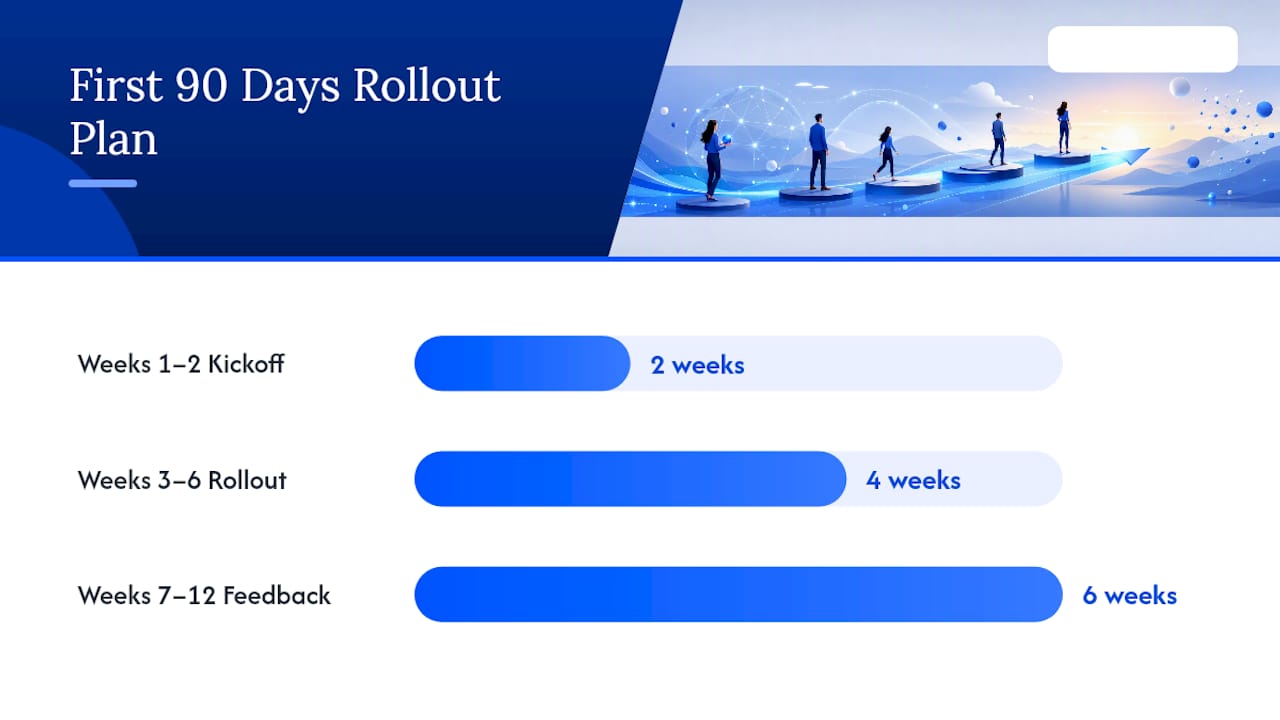
For your first 90 days: weeks one to two, build the kickoff packet and publish your SLA. Weeks three to six, roll out the weekly status template and start tracking response time. Weeks seven to twelve, add the feedback survey and review your first full data cycle.
If you're managing this across a mortgage brokerage specifically, a platform that centralizes CRM, communication, and pipeline visibility removes the manual work of stitching updates together across five different tools. 1 Solution Mortgage Software was built by brokers who got tired of exactly that problem.
Frequently Asked Questions
What are some quick examples of improved client communication I can start using today? Send a photo-first weekly status instead of a long email, acknowledge every request within an hour with an ETA, and replace open-ended questions with two clear options. All three take minutes to implement and produce faster client replies within days.
How often should I update clients on an active project? Weekly works for most active engagements; biweekly is enough for slower-moving projects. Consistency matters more than frequency, so pick a cadence you can actually sustain and publish it to the client.
What's the fastest way to improve client communication across a whole team? Standardize templates for kickoff, weekly status, and post-meeting summaries, then set a published response-time SLA. A shared template library fixes inconsistent messaging faster than any individual training session.
How do I measure whether my communication is actually working? Track CSAT after milestones, average response time, NPS at project close, and the number of unprompted "what's happening" questions you get each week. A falling number of inbound status questions is one of the clearest signs your proactive updates are working.
What should I do differently when delivering bad news to a client? Lead with the fact, not an apology, follow immediately with the cause and a specific plan, and send a written recap within the hour. Clients handle bad news better when it comes with a next step attached rather than just an explanation.
Sources
- Client Communication: 9 Tips, Skills & Real Examples (2026) | Vibe
- Client Communication Best Practices for Success
- GC Automates Client Updates, Saves 12 Hrs/Week Case Study
- Client Communication for Remote Teams: Templates and Best Practices - Gatilab