
This collection gives you paste-ready mortgage email templates for every stage of the loan file, from first contact through the closing table and beyond. You will also get the sequence timing, exit rules, and compliance basics that keep automated outreach both effective and legal. Copy what fits, adjust the details we flag below, and load the rest into your CRM.
TL;DR:
- Speeding response times to new leads within minutes significantly increases conversion chances compared to delayed replies.
- Personalizing emails with specific borrower details, such as property address or timeline, boosts engagement and helps avoid generic messaging.
- Building automated sequences around loan-file stages rather than fixed timeframes prevents outdated messaging and sequence overlap.
- Keeping subject lines under 40 characters and avoiding exclamation points improves deliverability and open rates.
- Using a connected platform that integrates CRM, loan status, and compliance tracking ensures accurate, timely, and legally compliant outreach.
Table of Contents
- Ready-to-Send Mortgage Email Templates by Loan Stage
- How to Customize Templates so They Actually Convert
- How Long Should a Mortgage Email Sequence Run?
- Subject Lines, Deliverability, and the Compliance Checklist
- What 20 Years in Mortgage Operations Teaches You About Email
- Why We Built These Templates Around Real Loan Files
- Automate These Templates Without Losing Control of Compliance
- Sources
- FAQ
Ready-to-Send Mortgage Email Templates by Loan Stage
Every loan officer template we have ever built started as a real email that worked, then got stripped down until only the parts that mattered were left. What follows are the seven stages where a good template saves you the most time and the most missed follow-ups.
1. New lead / instant response. Speed beats polish here. The moment a lead hits your CRM, this needs to fire.
Subject: Got your info, [First Name] — quick next step Preview text: Two minutes now saves you a week later.
Hi [First Name], thanks for reaching out about your home loan. I pulled up your details and have a couple of quick questions before I can give you real numbers. Do you have 10 minutes today for a call, or would tomorrow morning work better? Reply here or grab a slot on my calendar: [link].
2. Pre-approval delivery and pre-approval revival. The delivery email confirms the number in writing. The revival email is for the borrower who went quiet after getting pre-approved three months ago and never found a house.
Subject: Your pre-approval: $[Amount] at [Rate]
Hi [First Name], you're pre-approved for up to $[Amount]. That approval is valid through [Date]. Attach it to any offer your agent submits, or send it to me directly and I'll walk you through it.
Subject: Still shopping, [First Name]?
Hi [First Name], your pre-approval from [Month] is close to expiring. Rates and your numbers may have shifted since then, so let's refresh it before you find "the one." Fifteen minutes this week?
3. Application follow-up, document requests, and reupload requests. This is where clarity earns you speed. Vague document requests generate three follow-up emails; specific ones generate a portal upload the same day, which is why practical borrower email templates built for lenders lean hard on precision over politeness.
Subject: 3 items needed to keep your file moving
Hi [First Name], I need three things to keep your file on track: (1) your two most recent pay stubs, (2) last month's bank statement, (3) a copy of your driver's license. Upload them here: [portal link]. Missing these by [Date] pushes your closing date back.
Subject: Quick reupload — the last PDF didn't come through
Hi [First Name], the bank statement you sent came through blank on our end. No rush on the others, just that one file, same upload link: [portal link].
4. Underwriting conditions and milestone updates. Borrowers panic when underwriting goes quiet. A short status note costs you 90 seconds and saves you a worried phone call.
Subject: Update: your file is in underwriting
Hi [First Name], your loan is officially with our underwriting team as of today. Most files at this stage typically take several business days for a first look. I'll email you the moment there's a decision or a document request.
Subject: One more thing underwriting needs
Hi [First Name], underwriting has one condition left: [specific condition]. Upload it here: [portal link] and we're clear to close.
5. Rate-move alerts and the closing-day checklist. Rate alerts only go to borrowers still shopping or floating; closing checklists go out 48 to 72 hours before signing.
Subject: Rates moved — here's what it means for you
Hi [First Name], rates dropped [X] basis points this week. On your loan amount that's roughly $[Amount] a month. Want me to lock it in before it moves again?
Subject: Closing checklist: what to bring [Date]
Hi [First Name], you're closing on [Date] at [Time]. Bring a valid photo ID and your cashier's check for $[Amount], made out to [Title Company]. Wiring instructions were sent separately. Any last questions before then?
6. Post-close and anniversary touches. These build referral pipeline more than any newsletter ever will.
Subject: Congratulations on your new home, [First Name]!
Hi [First Name], congratulations again on closing. If anything comes up with your mortgage, or a friend mentions they're buying, I'm one email away.
Subject: One year in your home already
Hi [First Name], it's been a year since we closed on your loan. Rates and your equity picture have both likely shifted. Want a free five-minute review to see if a refinance makes sense?
7. Re-engagement and unsubscribe management. A short "still interested?" email before you remove someone from a sequence protects both your list health and your compliance record.
Subject: Should I stop emailing, [First Name]?
Hi [First Name], I haven't heard back in a while, so I don't want to clutter your inbox. Reply "yes" to keep getting updates, or I'll remove you from this list. You can also unsubscribe anytime here: [unsubscribe link].
How to Customize Templates so They Actually Convert
A template is a starting point, not a finished product. HousingWire's guidance on real estate email templates makes the same point: the copy itself rarely wins the deal. What wins is timing and one small detail that proves you actually read the file.
Add a single specific borrower detail to every email before you hit send. That is often the whole difference between a template that reads like a form letter and one that reads like it came from a person paying attention.
- Reference the actual property address, not "your new home."
- Mention their stated timeline ("since you mentioned closing before the school year starts").
- Callback something from your last conversation ("following up on the rate lock question you asked Tuesday").
- Name the specific loan program if it applies ("since you're using a VA loan").
Merge tokens speed this up across a CRM, but only if you build in fallbacks. A [First Name] token with no fallback sends "Hi ," which reads as sloppy at best and automated in a bad way at worst. Set a generic fallback like "there" or "Friend" for every token before the campaign goes live, and industry guidance on template testing backs up the same habit: check every token against a blank or incomplete record before it ever reaches a real inbox.
Before any template goes live in your sequence, run it through this quick check:
- Send yourself a test copy and open it on both desktop and mobile.
- Confirm every merge token renders correctly, including the fallback.
- Read the subject line and preview text together, exactly as they'll appear in an inbox.
- Verify the unsubscribe link and any portal or calendar links actually work.
- Check that the CTA is one clear action, not three competing ones.
Pro Tip: Keep a "swipe line" doc of five or six real personalization details you've used successfully. When you're moving fast between files, you'll grab from that list instead of leaving the personalization line blank.
For more on tailoring client-facing messages beyond email, our guide on customizing mortgage proposals covers the same principle applied to formal offer documents.
How Long Should a Mortgage Email Sequence Run?
Build sequences around what is happening in the loan file, not around a fixed number of days. A borrower who just submitted documents needs a different cadence than a cold lead who requested a rate quote and vanished. Our full breakdown of mortgage drip campaign structure goes deeper into building these by segment, but the core cadences below cover most brokerages.
- New inbound lead: Five emails over 14 days is a common industry starting point, with the first one firing within minutes of the lead landing, per HousingWire's cadence recommendations. Space the remaining four across days 2, 5, 9, and 14.
- Post-application milestones: One email per major status change, not per calendar day. That means an email when the file enters processing, another when it hits underwriting, and another at conditional approval.
- In-process updates: For loans sitting in underwriting longer than five business days, a proactive check-in every three to four days keeps the borrower calm without flooding their inbox.
- Post-close annual touches: One email at the 30-day mark, then one at each loan anniversary, tied to rate environment or equity changes rather than a generic "checking in."
Every sequence needs explicit exit rules built into your CRM logic, not just assumed:
- Conversion exit: the borrower locks a rate, submits an application, or signs closing docs, so the sequence stops immediately.
- Opt-out exit: any unsubscribe click removes them from every active sequence, not just the one they clicked from.
- Stage-advancement exit: moving from "new lead" to "application in progress" should automatically pull them out of the top-of-funnel sequence and into the next one.
- Manual pause: if a loan officer flags a file as stalled or sensitive, someone with permission needs the ability to freeze automated sends without killing the whole campaign.
The most common automation failure is not a bad template. It is two sequences running on the same borrower at once because a stage change did not trigger the exit rule fast enough, sending a "still interested in getting pre-approved?" email to someone who closed two weeks ago. Building sequences off loan-file status rather than calendar timers is the fix.
Subject Lines, Deliverability, and the Compliance Checklist
Short and specific beats clever every time. Subject lines under roughly 40 characters with concrete preview text consistently perform better in property and mortgage outreach, according to HousingWire's subject-line data. "Your pre-approval is ready" outperforms "Exciting news about your home buying journey!" almost every time, and it never needs an exclamation point or an emoji to do it.
- Keep subject lines under 40 characters and name the specific action or update.
- Skip exclamation points, all caps, and emoji. Spam filters flag them, and so do skeptical borrowers.
- Write preview text as a second, complementary sentence, never a repeat of the subject line.
- Send from a recognizable name, ideally a real person ("Maria at [Company]"), not a generic department address.
- Keep your list clean. Remove hard bounces and inactive addresses regularly, and confirm SPF and DKIM authentication are set up correctly on your sending domain.
Every marketing email, whether it's a one-off or part of an automated sequence, needs to meet a baseline set by the FTC's CAN-SPAM compliance guide: accurate sender information, a truthful subject line, a working unsubscribe link, and prompt processing of opt-out requests. Layer on top of that your NMLS ID and license disclosures where your state requires them, plus your company's physical business address in the footer.
If your outreach extends beyond email into texts or automated calls, 47 C.F.R. § 64.1200 governs consent and recordkeeping for that channel, and your documentation needs to track it separately from email opt-ins.
What 20 Years in Mortgage Operations Teaches You About Email
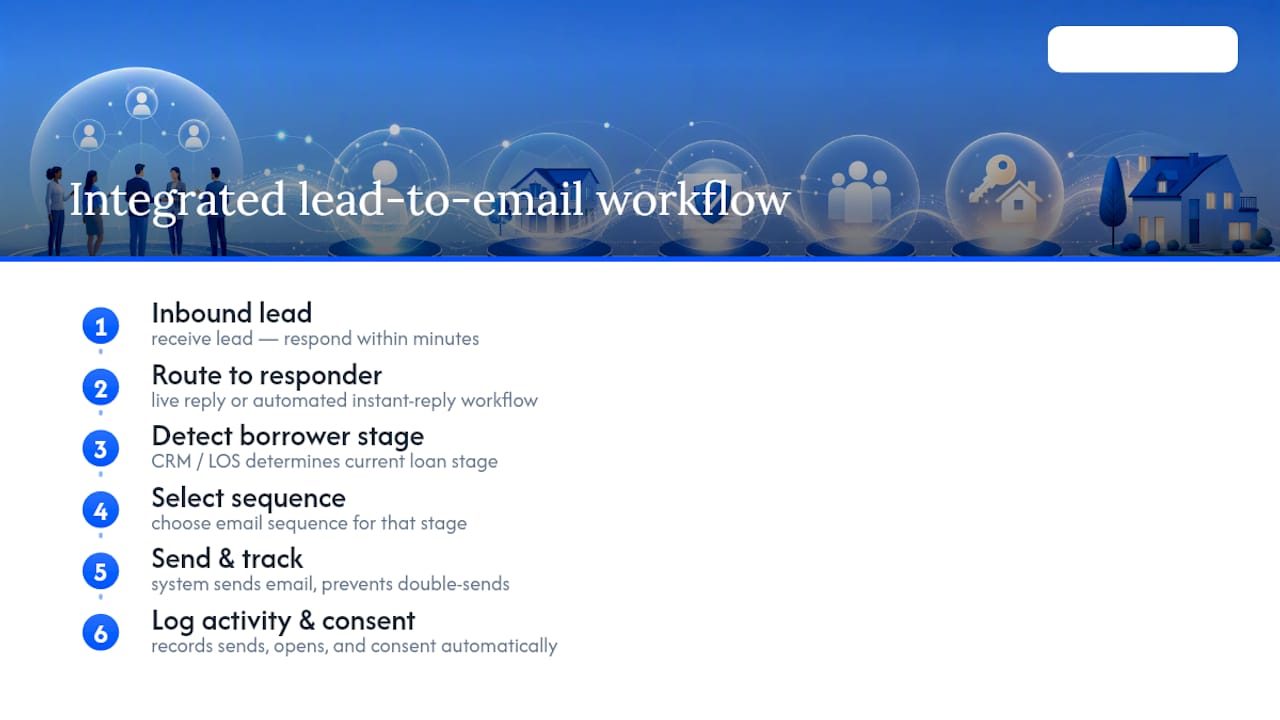
The single biggest lift in most brokerages is not a better template. It is closing the speed-to-lead gap. Routing an inbound lead to a live response, or an automated instant-reply workflow, within minutes rather than hours is what actually separates a converted borrower from a lost one. Someone on your team needs to own that first response as a job, not an afterthought.
An integrated CRM and loan origination workflow prevents the double-send problem covered above, because the system already knows a borrower's stage before it decides which sequence to fire. That same system should log every send, every open, and every consent record automatically, because when a compliance review or a borrower dispute comes up, "we think we sent that" is not an answer you want to give.
Why We Built These Templates Around Real Loan Files
These templates came out of watching brokers lose deals to slow replies and vague document requests, not out of a marketing brainstorm. Every version here reflects what actually keeps a file moving and a borrower informed, because compliance and clarity were never separate goals.
— Omar Khamisa
Automate These Templates Without Losing Control of Compliance
This mortgage software is built for brokers who want their email templates tied directly to loan-file status, not managed in a separate marketing tool that has no idea what stage a file is actually in. Pricing engines, CRM, and loan origination software often live in disconnected systems, which is exactly how double-sends and missed disclosures happen. Inside this mortgage software platform, your template library, CRM triggers, compliance footers, and send logs sit in one connected platform, so when a loan moves from application to underwriting, the right email fires and the wrong one does not.
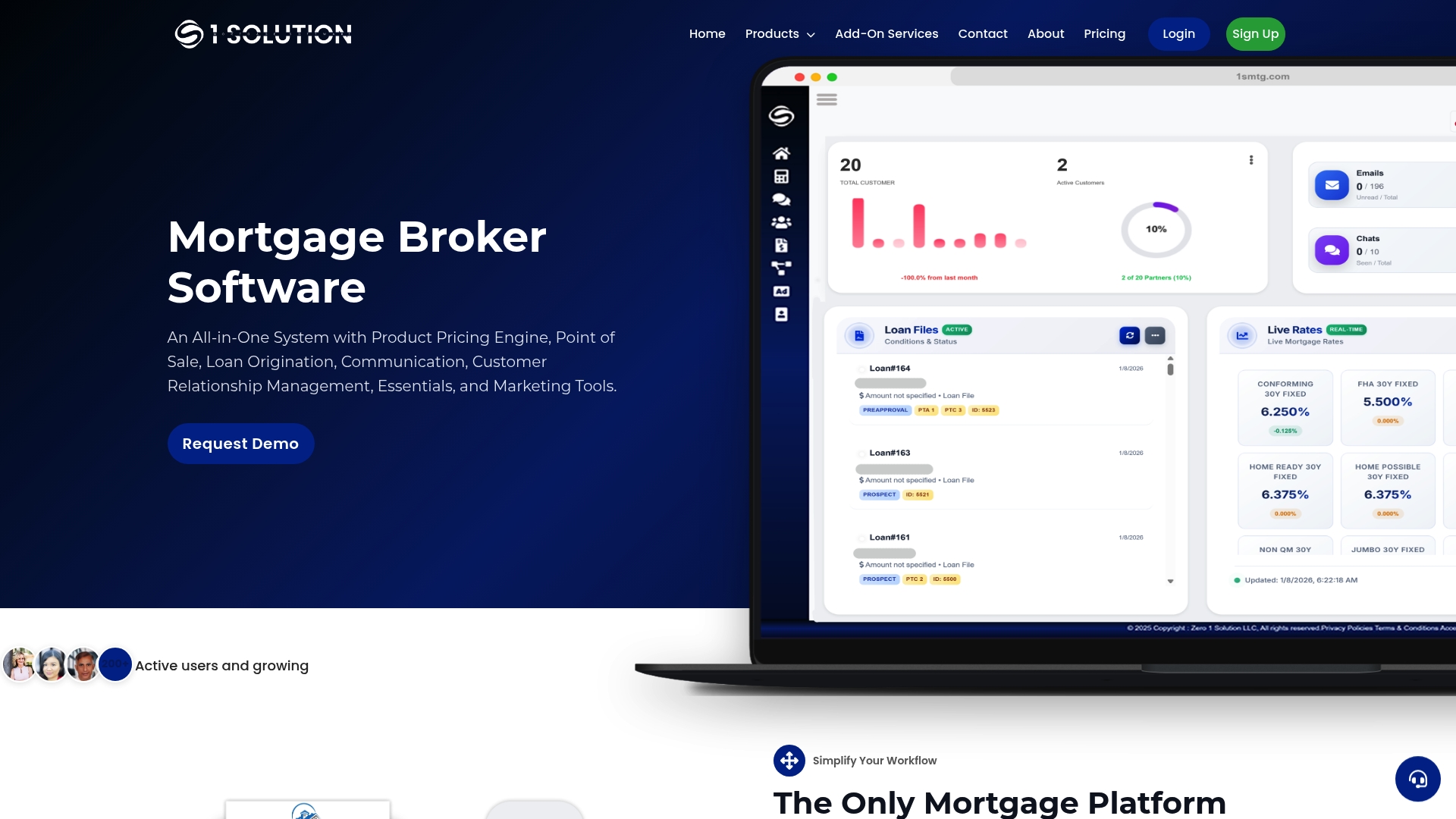
Every send gets logged automatically, which means your consent records and archived templates are ready the moment a compliance review asks for them. If you are still managing sequences across three disconnected tools, start a trial of 1 Solution Mortgage Software and see what a loan-file-triggered inbox actually looks like. For strategies on nurturing leads that stall mid-sequence, this lead nurturing guide pairs well with the automation setup.
Sources
- CAN-SPAM Act: A Compliance Guide for Business
- 47 C.F.R. § 64.1200 - Restrictions on telemarketing
- Real estate email templates and tips for high open rates (HousingWire)
- Free borrower email templates for loan officers (BorrowerDocs)
FAQ
Can you provide a sample email to a mortgage lender?
Yes. A borrower reaching out to a lender might write: "Hi [Loan Officer], I'm interested in getting pre-approved for a home purchase in [City]. My target price range is $[Amount], and I'd like to discuss loan options this week. What information do you need from me to get started?"
What makes a mortgage email example actually good?
A strong mortgage email leads with a specific action, uses a short and concrete subject line, and includes exactly one clear next step, whether that's uploading a document or booking a call.
Can you provide an example email for asking for payment or fees?
Yes: "Hi [First Name], to move forward with your loan application, we need your appraisal fee of $[Amount] processed by [Date]. You can pay securely here: [payment link]. Let me know if you have any questions before then."
Can you provide an example of a mortgage gift letter email?
A loan officer requesting one might write: "Hi [First Name], since part of your down payment is a gift, I need a signed gift letter from [Donor Name] confirming the funds don't need to be repaid, plus proof of transfer. Here's a template to use: [attached template]." The signed letter and transfer documentation typically satisfy underwriting on gift funds.
How do I segment my mortgage email list for better results?
Segment by loan stage (new lead, pre-approved, in underwriting, closed) and by loan type (purchase, refinance, VA, FHA, conventional), since a borrower in underwriting needs status updates while a closed borrower needs anniversary check-ins, not document requests.