
Mortgage software user permissions setup is the process of defining who can access which features, data, and loan records within your mortgage application platforms to enforce security and regulatory compliance. Done correctly, it protects non-public personal information (NPI), satisfies SOC 2 audit requirements, and gives every team member exactly the access they need to do their job. Done poorly, it creates compliance exposure, data breaches, and operational chaos. Platforms like Encompass use persona-based models that require both role assignment and organizational hierarchy placement to control what each user sees and does. Getting both dimensions right from day one is non-negotiable.
What are the core components of mortgage software user permissions?
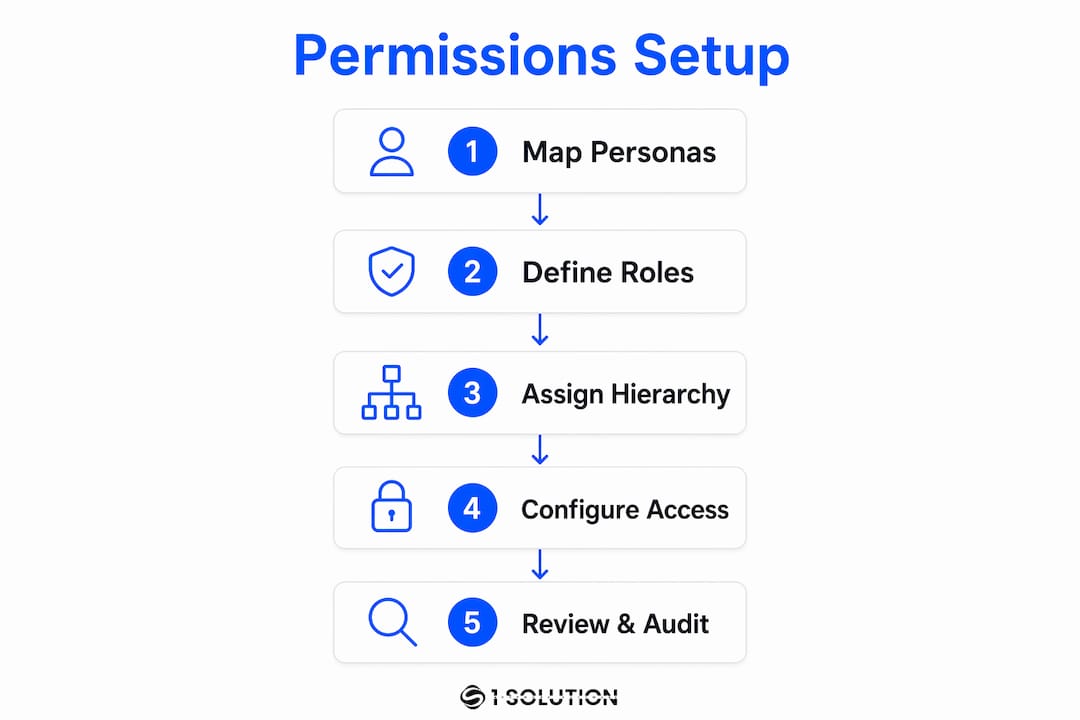
Mortgage software access controls operate on two distinct dimensions, and missing either one breaks the entire model. The first dimension is the persona or role assignment, which defines what functions and screens a user can access. The second is organizational hierarchy placement, which controls what data, loan folders, and reports that user can see. Encompass structures permissions exactly this way: every user must receive at least one persona and be placed within a branch or organizational node before they can work effectively in the system.
Persona-based vs. role-based access control
Persona-based permission models, used by platforms like Encompass, bundle a set of screen and field-level permissions into a named profile tied to a job function, such as Loan Officer, Processor, or Underwriter. Role-based access control (RBAC) is the broader industry framework behind this concept. RBAC frameworks simplify audits by allowing reviewers to examine roles rather than individual user permissions, which makes consistency and least-privilege enforcement far easier to demonstrate to auditors.

The table below compares the two models at a practical level:
| Dimension | Persona-based model | RBAC framework |
|---|---|---|
| Permission unit | Named persona (e.g., Processor) | Role mapped to job function |
| Scope control | Org hierarchy node assignment | Group or department membership |
| Audit approach | Review personas per user | Review role matrix |
| Best for | LOS platforms like Encompass | Enterprise identity systems |
| External users | Separate TPO personas available | External role groups |
External users, such as third-party originator (TPO) partners, require separate persona types with deliberately restricted access. Treating them the same as internal loan officers is one of the most common and costly permission errors in mortgage operations.
Pro Tip: Map every job title in your organization to a specific persona before you open the admin console. A permission matrix built in a spreadsheet first saves hours of rework inside the software.
What prerequisites do you need before configuring user access?
Preparation determines whether your mortgage software user permissions setup holds up under audit or falls apart at the first quarterly review. System administrators need full admin credentials in the LOS platform before touching any user records. Beyond that, you need four categories of information ready before you create a single account.
The required user data for each account includes:
- Login ID (immutable after creation in most platforms, so choose carefully)
- Full legal name and contact information
- Organizational hierarchy node (branch, division, or team assignment)
- Persona or role assignment tied to the user's job function
- License numbers for MLOs, where state law requires them in the system
- Employment status linked to your HRIS for automated provisioning triggers
Beyond individual user data, you need two foundational documents in place before setup begins.
| Document | Purpose |
|---|---|
| Permission matrix | Maps each job function to specific personas and org nodes |
| Access control policy | Defines approval workflows, review cadence, and deprovisioning rules |
Identity providers like Okta or Azure AD centralize authentication and enforce MFA, and automated HRIS-to-IdP workflows create audit trails that reduce manual errors during onboarding and offboarding. Integrating your HRIS with your LOS from the start is not a luxury. It is the difference between a defensible audit trail and a spreadsheet you hope no one scrutinizes too closely.
How to configure user roles and permissions step by step
With your permission matrix and user data ready, the actual configuration follows a repeatable sequence. Skipping steps or doing them out of order creates access failures that are genuinely difficult to diagnose after the fact.
-
Create the user account. Enter the login ID, full name, email, and phone number. Confirm the login ID is correct before saving. In Encompass and similar platforms, login IDs are immutable once created, meaning a typo requires deactivating the account and starting over.
-
Assign one or more personas. Select the persona or personas that match the user's job function from your pre-built permission matrix. A Processor who also handles disclosures may need two personas. Assign only what the role requires.
-
Place the user in the organizational hierarchy. Assign the user to the correct branch or organizational node. This placement directly controls which loan folders, pipelines, and reports the user can see. A user without a hierarchy assignment has no data visibility, even with a valid persona.
-
Configure administrative privileges. If the user requires admin access, apply the minimum level necessary. Administrative accounts can create, modify, or delete users and access sensitive NPI and financial data, which represents significant security risk. Limit standing admin access to no more than two or three named individuals.
-
Set session and security controls. Apply a 15-minute idle timeout, enforce single concurrent sessions, and require re-authentication for sensitive actions. These session controls reduce the risk of unauthorized access from unattended workstations, which is a real threat in open-plan broker offices.
-
Enable MFA. Multi-factor authentication is required for any user accessing NPI or performing administrative functions. Enforce it at the platform level, not as an optional setting.
-
Document and approve. Record the persona assigned, hierarchy node, and approving manager before the account goes live. This documentation is your provisioning evidence for SOC 2 audits.
Pro Tip: Never activate a new user account on a Friday afternoon. Permissions errors discovered after hours have no immediate fix, and an MLO locked out of the system on a Monday morning costs real money.
What are the most common mistakes in permissions setup?
The errors that create the most compliance exposure are rarely dramatic. They are quiet, accumulative, and often invisible until an auditor or a breach surfaces them.
-
Missing hierarchy assignment. A user with a valid persona but no org node assigned cannot access loan data. This is one of the most common support tickets in Encompass environments, and it is entirely preventable with a pre-setup checklist.
-
Over-permissioning by default. Assigning a broad admin persona to a new hire because it is faster than configuring a precise role is a direct violation of least-privilege principles. Every excess permission is a liability.
-
Privilege creep over time. Users accumulate permissions as their roles evolve, and no one removes the old ones. A processor promoted to loan officer still has processor-level access to fields they no longer need. Periodic reviews exist specifically to catch this.
-
Standing privileged access. Limiting standing admin privileges and adopting time-bound elevation workflows effectively reduce security risks. Permanent admin accounts that are never reviewed are an open door.
-
Inactive accounts left open. Former employees whose accounts remain active after termination are a critical vulnerability. Automated offboarding linked to HRIS status changes is the gold-standard control here. Manual deprovisioning processes fail because they depend on someone remembering to act.
-
Ignoring external user permissions. TPO partners and third-party vendors need their own restricted personas. Giving them internal user access because it is convenient creates data exposure that is hard to explain to a regulator.
The role of technology in mortgage operations has expanded to the point where permission errors are no longer just IT problems. They are compliance failures with direct business consequences.
How to maintain and audit permissions for ongoing compliance
A permissions setup that was correct on day one will drift out of compliance within months without a structured maintenance process. SOC 2 and most state-level mortgage regulations require documented, repeatable access review cycles.
-
Conduct quarterly user access reviews. SOC 2 requires quarterly reviews to verify that all active accounts are appropriate and that permissions match current job functions. Assign a named owner for this process, not a shared responsibility that no one owns.
-
Review privileged access monthly. Admin accounts carry higher risk and require more frequent scrutiny. Monthly attestation by a senior manager or compliance officer is the standard that auditors expect.
-
Retain provisioning and deprovisioning evidence. Every account creation, modification, and termination needs a documented record with the approving manager's name and the date. This evidence answers the auditor's core question: who approved this access and when?
-
Use your role matrix as the review baseline. Compare each active user's current permissions against the matrix during every review cycle. Any deviation is either a legitimate change that needs documentation or an error that needs correction.
-
Align audit logs with your review process. System-generated audit logs from your LOS platform are your most credible evidence source. Effective access governance requires that permissions setup is tightly integrated with audit-log monitoring and attestation workflows.
Auditors favor access control processes that produce repeatable, documented, and auditable results. A well-maintained permission matrix reviewed on a fixed cadence is worth more than any technical control you cannot demonstrate.
Mortgage professionals managing compliance setup processes in 2026 should treat the quarterly access review as a standing calendar event, not a reactive task triggered by an audit notice.
Key takeaways
Effective mortgage software user permissions setup requires both role assignment and organizational hierarchy placement, maintained through documented quarterly reviews to satisfy SOC 2 and protect NPI.
| Point | Details |
|---|---|
| Two-dimensional model | Assign both a persona and an org hierarchy node to every user or access will fail. |
| Least privilege enforcement | Grant only the permissions each job function requires and remove excess access during quarterly reviews. |
| Admin access limits | Restrict standing admin accounts to two or three named individuals and review them monthly. |
| Automated offboarding | Link HRIS termination events to account deprovisioning to eliminate inactive account risk. |
| Documented evidence | Retain provisioning, modification, and deprovisioning records to satisfy SOC 2 audit requirements. |
Why permissions setup is the foundation, not the finish line
I have spent over 20 years inside mortgage operations, working as a processor, underwriter, loan originator, and systems consultant. The single most consistent finding across every shop I have worked in or consulted for is this: permissions are treated as a one-time setup task rather than an ongoing governance function. That mindset is where most compliance exposure originates.
The instinct to give a new hire broad access so they can "figure out what they need" is understandable. It is also wrong. Every permission granted beyond what a role requires is a liability you are carrying silently. I have seen shops fail SOC 2 audits not because they lacked controls, but because they could not produce evidence that those controls were reviewed consistently.
The other mistake I see constantly is treating admin access as a convenience rather than a privilege. Two or three people should hold standing admin credentials in any mortgage operation. Everyone else who occasionally needs elevated access should request it through a time-bound process. This is not bureaucracy. It is the difference between a defensible security posture and a breach waiting to happen.
Build your permission matrix before you open the admin console. Review it quarterly without exception. Automate your offboarding. And treat your audit logs as a compliance asset, not an IT artifact. Loan officers trained on software access controls from day one operate more confidently and create fewer permission-related support issues. The investment in getting this right upfront pays back every single quarter.
— Omar Khamisa
Configure user permissions with 1 Solution Mortgage Software
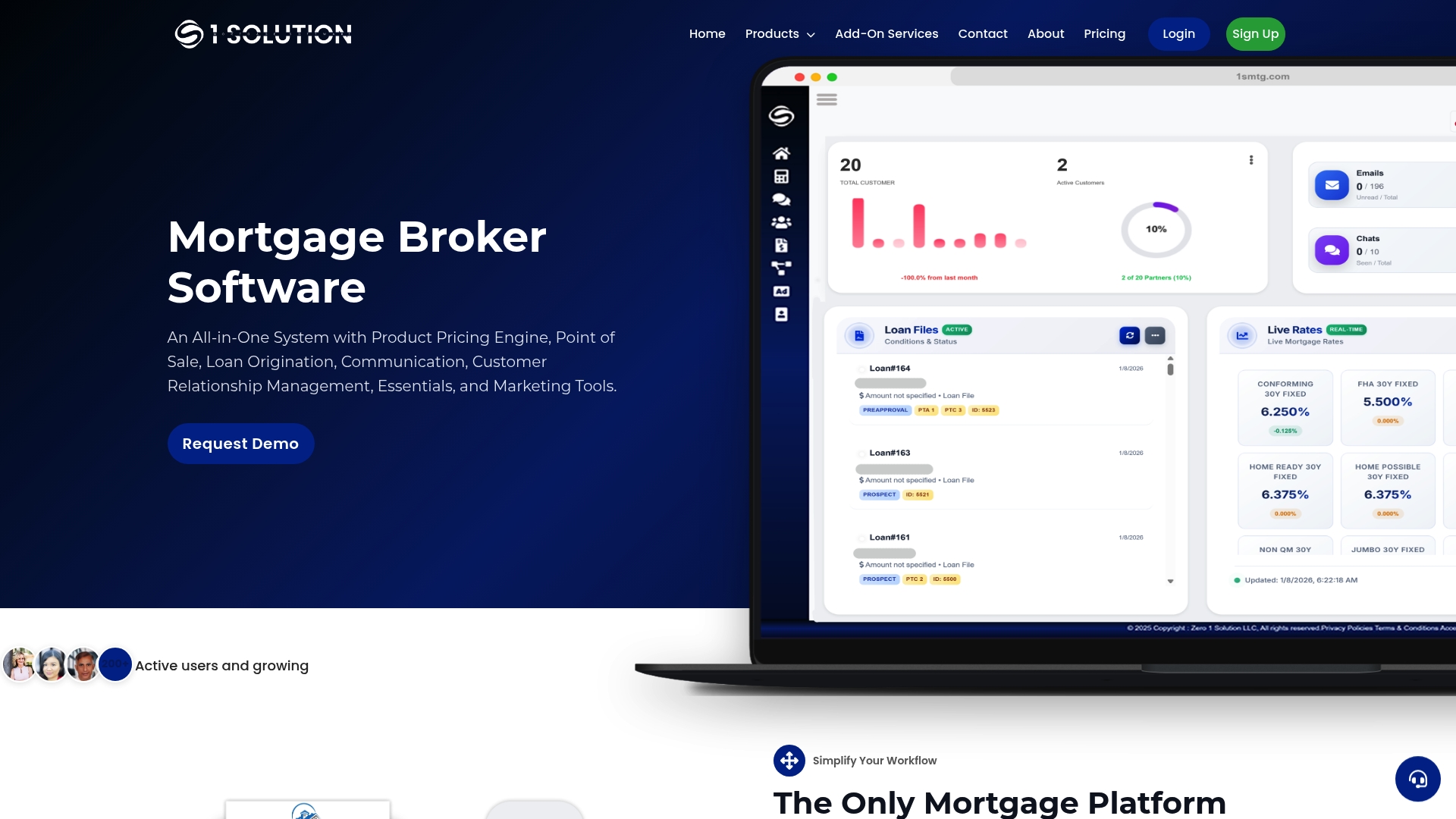
1 Solution Mortgage Software was built by mortgage professionals who have lived the frustration of fragmented systems and opaque permission controls. Our platform gives brokers direct control over user roles, organizational hierarchy assignments, and compliance-ready access management without requiring an IT department to make it work. Every feature in our all-in-one platform is designed around how independent mortgage operations actually function, not how a bank's IT team thinks they should. If you are ready to configure user permissions in a system built for brokers, not boardrooms, we are ready to show you exactly how it works.
FAQ
What is mortgage software user permissions setup?
Mortgage software user permissions setup is the process of assigning roles, personas, and organizational hierarchy placements to each user in a mortgage platform to control their access to features, loan data, and reports. It is required for security, compliance, and operational accuracy.
How does organizational hierarchy affect user permissions?
Organizational hierarchy placement in platforms like Encompass directly controls which loan folders, pipelines, and reports a user can see. A user assigned a valid persona but no hierarchy node has no data visibility in the system.
How often should mortgage software permissions be reviewed?
SOC 2 requires quarterly user access reviews for standard accounts and monthly reviews for privileged admin accounts, with retained attestation evidence for each review cycle.
What is the risk of leaving inactive accounts open?
Inactive accounts belonging to former employees represent a direct security and compliance vulnerability. Automated offboarding linked to HRIS termination events is the standard control to eliminate this risk.
What is the difference between a persona and a role in mortgage software?
A persona is a platform-specific bundle of screen and field-level permissions tied to a job function, such as Processor or Underwriter. A role is the broader RBAC concept that maps job functions to permission sets, often managed through identity providers like Okta or Azure AD.