

For most independent mortgage brokers evaluating one-solution.com alternatives, the right move is a broker-focused, cloud-based platform that bundles LOS, CRM, a product pricing engine (PPE), and a borrower POS portal with pre-built credit bureau and AUS integrations. That combination covers the full origination workflow without forcing you to stitch together three separate tools.
Here is the shortlist by category:
- Broker-focused LOS+CRM+PPE (recommended): Built for independent brokers, not banks. 1 Solution Mortgage Software is the broker-built option here.
- Enterprise LOS suites: nCino Mortgage Suite and MeridianLink Mortgage (LoanSphere) serve larger lenders with deep compliance infrastructure.
- Cloud LOS with investor connectors: Blend and Floify target digital-first origination with strong borrower-facing portals.
- CRM-first platforms with PPE add-ons: BNTouch Mortgage CRM and QuickQual prioritize pipeline management and pre-qualification over full LOS depth.
- Compliance and e-sign specialists: DocMagic and Calyx Point (Calyx Software) anchor document generation and closing workflows.
Analysts recommend prioritizing pre-built AUS and credit bureau integrations when evaluating alternatives, because those connections are far harder to replicate than a generic CRM dashboard. SOC 2 certification is the baseline security standard to require from any vendor on your shortlist.
1 Solution Mortgage Software is the recommended broker-built option because it was designed from the ground up for independent brokers, not retrofitted from a bank-facing product.
Table of Contents
- How do one-solution.com alternatives compare at a glance?
- How to choose the right one-solution.com alternative for your brokerage
- Migration and implementation checklist
- How we selected and compared these categories
- Key Takeaways
- What most brokers get wrong when switching platforms
- 1 Solution Mortgage Software: the broker-built alternative
- Authoritative sources and vendor documentation
How do one-solution.com alternatives compare at a glance?
| Category | Best For | Core Modules | Key Integrations | Pricing Model | Deployment & Mobile | Security | Onboarding |
|---|---|---|---|---|---|---|---|
| Broker-focused LOS+CRM+PPE | Independent brokers, small brokerages | LOS, CRM, PPE, POS, e-sign, compliance, marketing | Credit bureaus, AUS, eClosing, investor connectors | Subscription SaaS; optional add-ons | Cloud, mobile-ready | SOC 2 | 2–4 weeks |
| Enterprise LOS suite | Mid-to-large lenders, banks | LOS, compliance, e-sign, reporting | AUS, credit bureaus, secondary market | Enterprise contract; per-seat or volume | Cloud/hosted | SOC 2, ISO | 3–6 months |
| Cloud LOS with borrower portal | Digital-first brokers, retail lenders | LOS, POS, e-sign | Credit bureaus, AUS, eClosing | Subscription; implementation fee | Cloud, strong mobile | SOC 2 | 4–8 weeks |
| CRM-first with PPE add-on | Small teams, cost-conscious brokers | CRM, PPE, basic POS | Limited AUS; credit bureau via add-on | Lower monthly SaaS | Cloud, mobile app | Varies | 1–3 weeks |
| Compliance and e-sign specialist | Lenders needing doc-gen depth | e-sign, compliance, doc generation | eClosing, investor connectors | Per-transaction or subscription | Cloud/hosted | SOC 2 | 2–4 weeks |
| Full-stack broker LOS | Established brokerages | LOS, PPE, compliance | Credit bureaus, AUS | Per-seat subscription | Desktop-first; limited mobile | SOC 2 | 4–8 weeks |
| Investor-connector platform | Wholesale and correspondent lenders | LOS, investor pricing, compliance | Investor channels, AUS | Volume-based | Cloud | SOC 2 | 4–10 weeks |
| Marketing-led CRM | Brokers prioritizing lead nurture | CRM, marketing automation, e-card | Basic integrations | Low monthly SaaS | Cloud, mobile | Varies | 1–2 weeks |
| Modular enterprise platform | Large lenders, credit unions | LOS, CRM, PPE, compliance, reporting | Full credit bureau, AUS, secondary market | Enterprise; modular pricing | Cloud/hosted | SOC 2, ISO | 3–9 months |
SourceForge curates a list of mortgage platform alternatives with user ratings that is useful for building an initial longlist before applying these filters.
Pricing notes:
- Broker-focused SaaS platforms typically run on monthly subscriptions with optional add-ons for website development, branded email, or PBX.
- Enterprise LOS suites carry implementation fees that can run well above the annual license cost.
- GetApp notes that CRM-first platforms offer better value for small teams when full LOS depth is not required.
- Always ask vendors to separate base subscription, integration fees, and per-transaction costs before comparing total cost of ownership.
How to choose the right one-solution.com alternative for your brokerage
Start with integrations, then data migration ease, then total cost. That order matters because a platform with weak AUS or credit bureau connections will create manual workarounds that cost more in labor than any subscription savings.
Evaluation criteria and scoring template:
- Integrations (weight: 30%): Does the platform connect natively to the credit bureaus you use, your AUS of choice (Fannie Mae DU, Freddie Mac LP), and your eClosing or investor channels?
- LOS depth (weight: 20%): Can it handle your full loan file from application through closing, or does it hand off to a third-party system mid-process?
- PPE accuracy (weight: 15%): Does the pricing engine pull live rates and support your wholesale channel relationships?
- POS and borrower experience (weight: 15%): Is the borrower portal branded, mobile-friendly, and capable of document collection?
- Security and compliance (weight: 10%): SOC 2 Type II is the floor. Ask for the audit report, not just a checkbox.
- Onboarding and time-to-live (weight: 5%): How long before your team is fully operational? Weeks matter in a rate-sensitive market.
- Total cost of ownership (weight: 5%): Add base subscription, integration fees, training, and any per-transaction costs.
Demo questions to ask every vendor:
- Show me a live credit bureau pull inside the platform. Which bureaus are connected natively?
- Walk me through a DU or LP submission from inside the LOS. Is it a direct integration or a file export?
- What does data export look like? Can I pull all loan files, borrower records, and pricing templates in a standard format on day one?
- What is your SOC 2 audit status, and can you share the report?
- What is the typical time-to-live for a brokerage our size, and who leads implementation on your side?
- What add-ons are priced separately from the base subscription?
Red flags to watch for:
- No SOC 2 report available on request.
- AUS integration requires a manual file export rather than a live API connection.
- Onboarding is "self-serve only" with no dedicated implementation contact.
- Add-on fees are not disclosed until contract negotiation.
Pro Tip: During the demo, ask the vendor to submit a test loan through DU or LP in real time. A platform that cannot demonstrate a live AUS connection during a sales call almost certainly does not have one.
Migration and implementation checklist
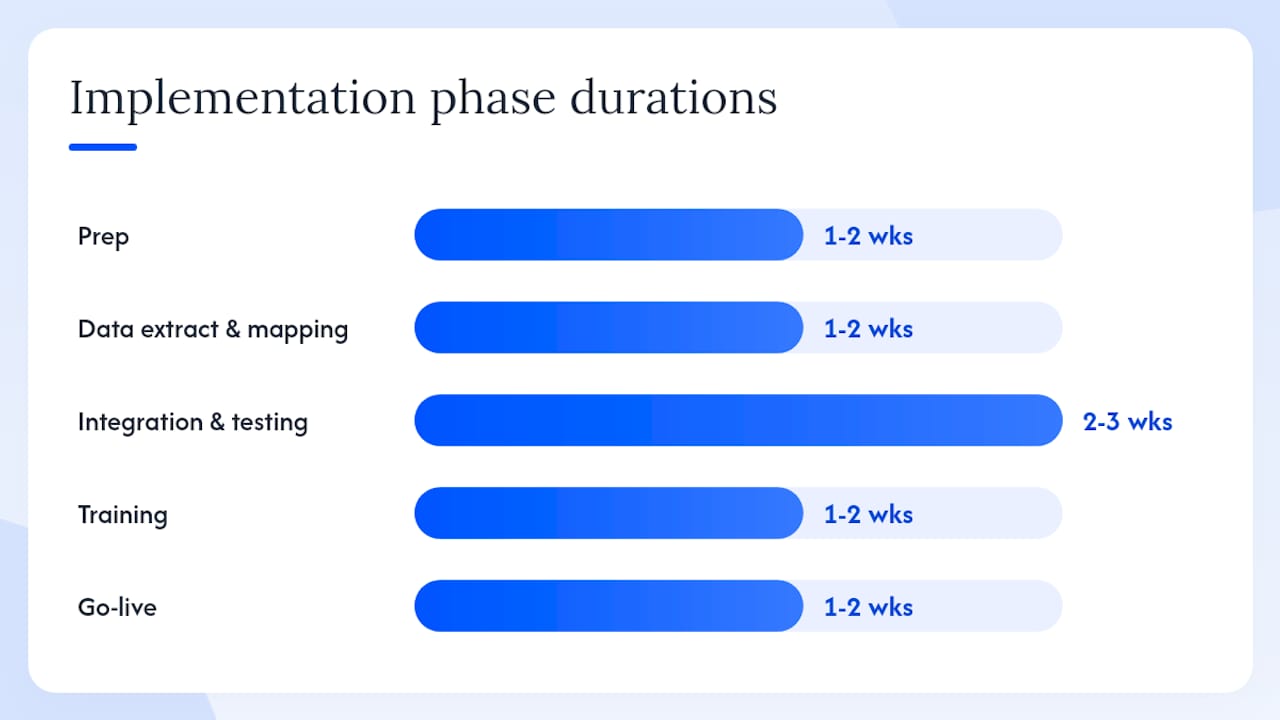
Plan for a minimum of six to eight weeks from contract signature to go-live, with an operations lead and an IT contact assigned on your side from day one.
Data export checklist (extract before you cancel your current platform):
- All active and closed loan files in a standard format (CSV or XML).
- Borrower contact records, including communication history.
- Pricing rules, rate templates, and product configurations.
- Document templates (disclosures, pre-approval letters, proposals).
- User accounts, roles, and permission structures.
- Pipeline reports and custom dashboards.
Implementation timeline:
| Phase | Key Tasks | Typical Duration |
|---|---|---|
| Prep | Process mapping, data audit, vendor kickoff | 1–2 weeks |
| Data extract and mapping | Export, clean, and map records to new schema | 1–2 weeks |
| Integration and testing | Connect credit bureaus, AUS, eClosing; UAT | 2–3 weeks |
| Training | Admin and user training, workflow documentation | 1–2 weeks |
| Go-live | Parallel run or cutover; hypercare support | 1–2 weeks |
Cost drivers to budget for: integration setup fees, data cleanup labor, custom report builds, third-party license overlaps during parallel run, and training time.
Pro Tip: Run a parallel operation for at least two weeks before full cutover. Processing even five loans through the new platform before you go live will surface mapping errors that no amount of UAT catches in a test environment. See our mortgage office workflow design guide for a pre-migration process mapping template.
How we selected and compared these categories
The comparison prioritized integration depth, LOS completeness, PPE coverage, and onboarding speed, because those four factors determine whether a platform actually fits a broker's daily workflow or just looks good in a demo.
Criteria used:
- Native credit bureau and AUS integrations (hardest to replicate, highest operational impact).
- Module completeness: LOS, CRM, PPE, POS, e-sign, compliance in one platform vs. assembled stack.
- Security certifications: SOC 2 Type II as the baseline requirement.
- Onboarding timeline and support model (dedicated vs. self-serve).
- Total cost of ownership across base subscription, add-ons, and implementation.
- User ratings and review patterns from SourceForge and GetApp.
Sources consulted include SoftwareWorld's alternatives list, CB Insights company profiles, Tracxn market data, Alternative.to category listings, and the 1 Solution Mortgage Software platform documentation.
Author: Omar Khamisa, founder of 1 Solution Mortgage Software, brings over two decades of hands-on mortgage operations experience to this analysis.
Key Takeaways
The single most important action you can take this week is to run the demo checklist above with 1 Solution Mortgage Software before evaluating any other platform on your shortlist.
| Point | Details |
|---|---|
| Integrations come first | Prioritize native credit bureau and AUS connections; they are harder to replicate than CRM features. |
| SOC 2 is the security floor | Require a SOC 2 Type II audit report from every vendor, not just a checkbox on a sales deck. |
| Budget six to eight weeks minimum | Plan for prep, data mapping, integration testing, training, and a parallel run before full cutover. |
| CRM-first platforms suit small teams | For cost-conscious brokers who do not need full LOS depth, CRM-first options offer better value per dollar. |
| 1 Solution Mortgage Software is the broker-built option | It combines LOS, CRM, PPE, POS, and compliance in one cloud platform built specifically for independent brokers. |
What most brokers get wrong when switching platforms
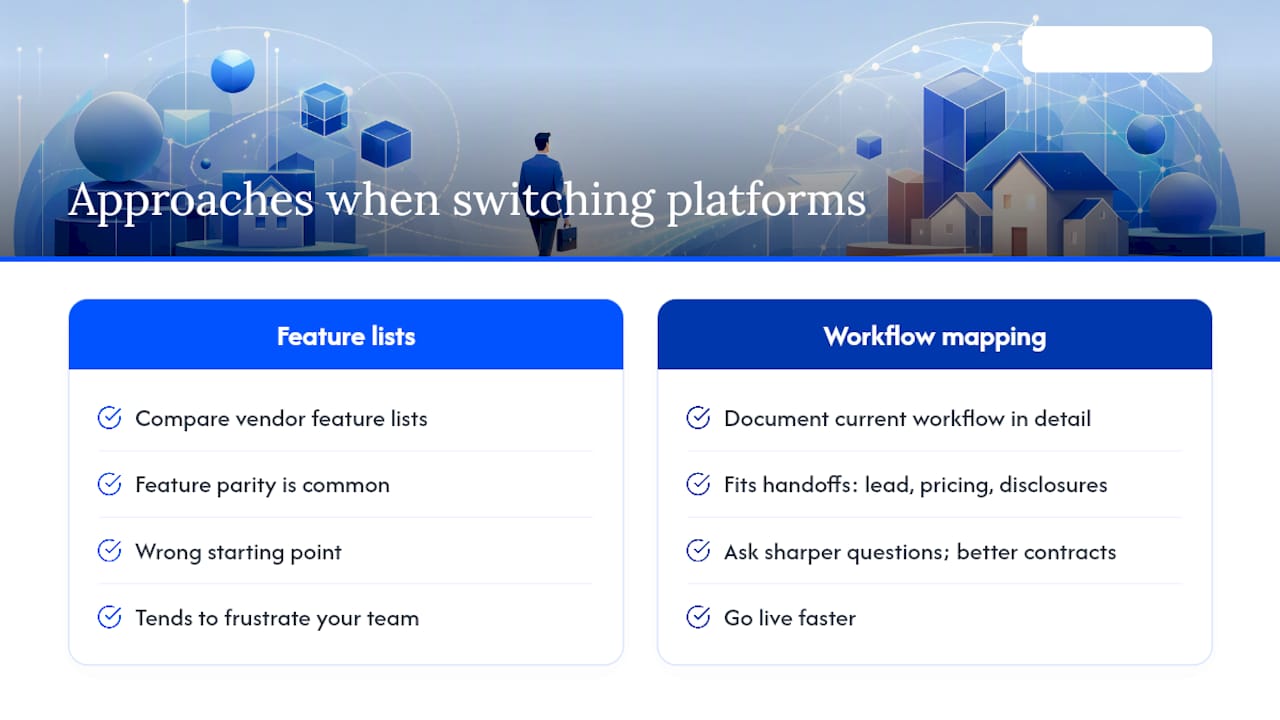
The conventional wisdom says to compare feature lists. That is the wrong starting point. Feature parity across mortgage platforms is closer than most vendors admit. What actually separates a platform that works from one that frustrates your team is whether it fits the specific handoffs in your workflow: how a lead becomes a loan file, how pricing gets to a borrower, and how a disclosure gets signed and stored.
Most migration failures trace back to incomplete internal process mapping before the switch, not to a bad software choice. Brokers who document their current workflow in detail before they ever open a vendor demo tend to ask sharper questions, negotiate better contracts, and go live faster. The checklist in this article is designed to force that discipline.
One more thing worth saying plainly: a platform built by people who have never originated a loan will always have gaps that only show up after you are live. That is not a knock on any specific vendor. It is just the reality of mortgage technology built for banks being adapted for brokers. The types of mortgage automation tools available today are genuinely good. But fit matters more than features.
1 Solution Mortgage Software: the broker-built alternative
If you have worked through this comparison and want a platform where LOS, CRM, PPE, POS, e-sign, compliance, and communication tools are already connected, not assembled from separate vendors, 1 Solution Mortgage Software was built for exactly that.
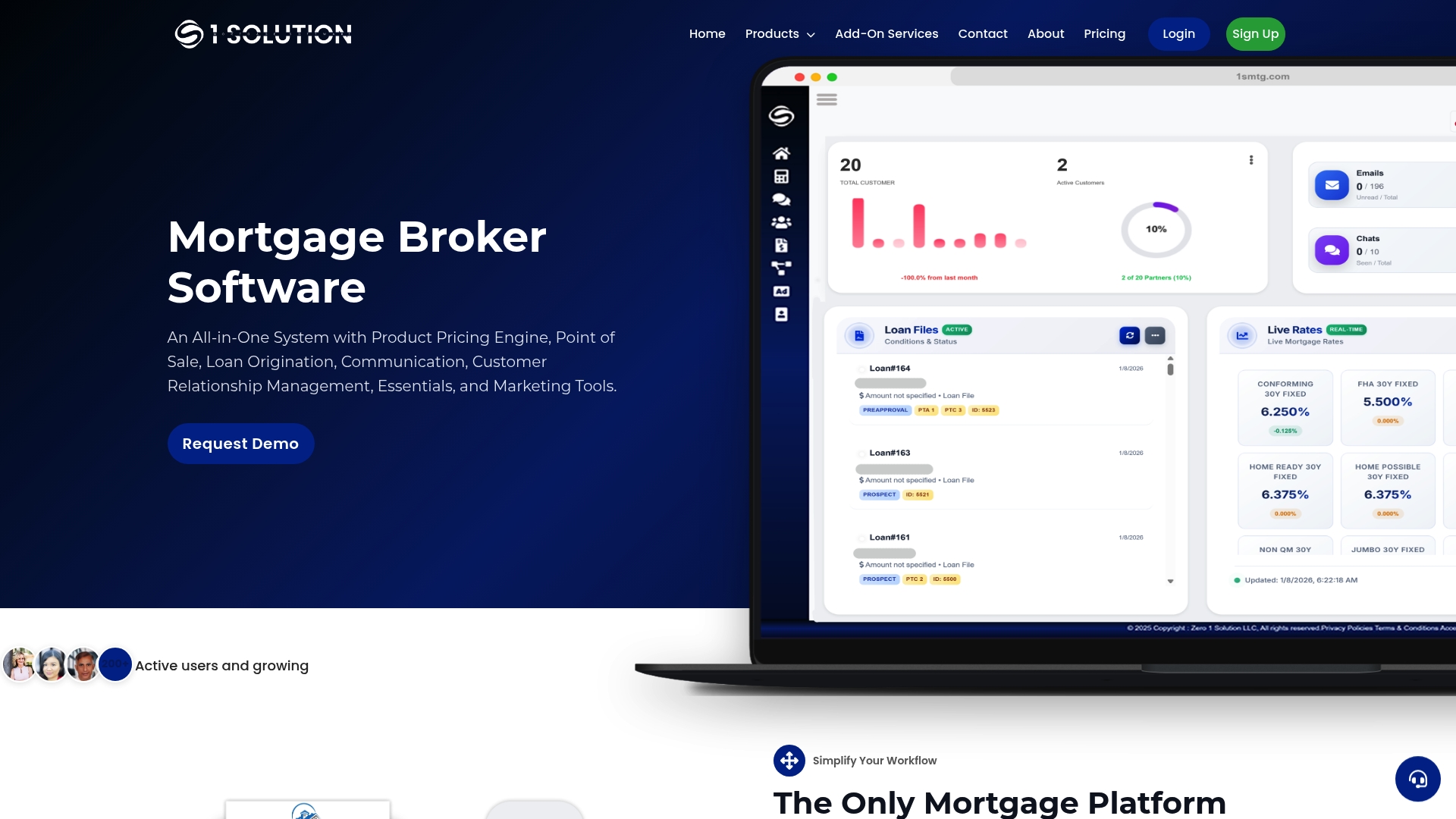
Founded by a mortgage operations practitioner with 20+ years across processing, underwriting, and origination, 1 Solution Mortgage Software is 100% self-funded and independent. The roadmap answers to brokers, not investors. Pricing is subscription-based with optional add-ons, and onboarding runs two to four weeks for most independent brokerages. Schedule a demo at 1smtg.com to see the platform live and get a migration readiness assessment for your current setup.
Authoritative sources and vendor documentation
The sources below were used to build the shortlist and are worth bookmarking when preparing vendor RFPs or verifying feature claims.
- Top 1 Solution Mortgage Software Alternatives & Competitors
- Best 1 Solution Mortgage Alternatives & Competitors (SourceForge)
- 1Solution Mortgage Software 2026 Pricing, Features, Reviews & Alternatives | GetApp
- One Solution - Products, Competitors, Financials, Employees, Headquarters Locations
- One Solution company profile (Tracxn)
- ONESolution | Alternative.to
- 1 Solution Mortgage Software
- Friendly Financial Group
This article was last reviewed in 2026. For corrections or updates, contact the editorial team through 1smtg.com. This article provides general information for mortgage professionals and is not legal, financial, or compliance advice. Confirm current platform capabilities and regulatory requirements with your vendors and qualified compliance counsel.