
Six capabilities separate a borrower portal that pays for itself from one that just sits on a login page: real-time account visibility, payments with reliable AutoPay reconciliation, a secure document hub with audit trails, loan-tied messaging, seamless integration with your LMS, LOS, and payment engines, and enterprise-grade security controls. Every other feature is a nice-to-have. The sections below break down what to test in a demo, what a realistic rollout timeline looks like, and how to budget for the gap between "looks good in a sales call" and "works under real servicing volume."
TL;DR:
- A borrower portal must deliver real-time account updates and seamless integration with your servicing systems to prevent data lags and manual reconciliation issues.
- Avoid portals that require human oversight for document routing, lack mobile-friendly design, or have weak permissions, as these hinder automation and security.
- During demos, verify live payment posting speed, AutoPay functionality, document attachment accuracy, and multi-loan portfolio views to ensure practical performance.
- Evaluate vendors based on non-negotiables like data sync frequency, SLA commitments, role permissions, and security controls before engaging in detailed testing.
- Full deployment typically requires six to twelve weeks for integration and rollout, emphasizing early security measures and pilot testing with complex borrower scenarios.
Table of Contents
- What Is a Borrower Portal, and What Should It Deliver?
- Why Most Borrower Portals Disappoint in Practice
- Core Borrower Portal Features, Feature by Feature
- How to Evaluate Vendor Fit Without Getting Burned
- Implementation and Security Lessons From the Field
- Multi-Language Support: Don't Treat It as an Afterthought
- Support and Onboarding: Getting Borrowers to Actually Use the Portal
- Author Perspective: The Portal Is Infrastructure, Not a Widget
- How 1 Solution Approaches Borrower Portals
- Sources
- FAQ
What Is a Borrower Portal, and What Should It Deliver?
A borrower portal is a self-service interface that connects a borrower directly to their loan record, so account activity, payments, and documents live in one continuously updated system rather than scattered across phone calls and email threads. The best implementations treat the portal as an extension of the loan servicing engine, not a bolted-on website. When a portal is genuinely tied into the servicing stack, borrower actions like a payment or a document upload update the same record your staff sees, instead of creating a parallel copy that someone has to reconcile by hand.
Done right, the operational payoff shows up fast. Borrower self-service portals lower servicing costs largely by moving routine requests, payment history checks, statement pulls, payoff quotes, out of the call queue and into a digital workflow borrowers complete themselves.
The measurable benefits worth tracking include:
- Fewer inbound calls for routine account questions
- Faster document turnaround between borrower and staff
- Clearer repayment visibility that reduces missed-payment disputes
- Compliance-ready audit trails for every borrower interaction
That last point is where the definition matters most. A portal that only displays a balance and a "make a payment" button is a marketing front end. A portal your loan servicing team can rely on ties every action, payment, document, message, back to the loan record with a timestamp your compliance team can pull on demand.
Why Most Borrower Portals Disappoint in Practice
Demos are designed to hide the weaknesses that show up six months into deployment. Watch for these five red flags before you sign anything.
- Data lags behind the LMS or LOS. If a payment posted through the portal takes hours (or requires a manual batch job) to reflect in your servicing system, your staff is working from stale numbers, and the payoff quote your borrower just pulled might already be wrong.
- Document flows that need a human in the loop. If every uploaded document lands in a generic inbox instead of attaching automatically to the correct loan file with a searchable audit log, you have not automated anything. You have just moved the paperwork.
- Mobile experiences that borrowers avoid. A portal that renders poorly on a phone, or buries the payment button three menus deep, kills adoption regardless of how strong the back-end is.
- Weak permissions and session controls. Co-borrower access, joint accounts, and multi-loan households need granular role-based permissions. A portal without multi-factor authentication or proper session logging is a liability, not a feature.
- Rigid, one-size-fits-all configuration. If every borrower sees the same interface regardless of loan product, you lose the ability to tailor disclosures, payment options, or document requests to what that specific loan actually requires.
Core Borrower Portal Features, Feature by Feature
This is the checklist to run during an actual demo, not the marketing one-pager. Test each item with a real scenario, not a canned walkthrough the sales rep controls.
Real-time account visibility. Ask to see a payment post live, then check how quickly it appears on the servicing side. Verify transaction-level detail (not just a running balance), payoff quote accuracy, and whether the reconciliation fields staff see match what the borrower sees. A one-day lag might be tolerable; a batch-overnight sync usually is not.
Payments and AutoPay. Test a single-account payment and a multi-account payment from one login. Enroll a test account in AutoPay and confirm the receipt generation and the reconciliation record staff receive afterward. This is where borrower complaints spike fastest when something breaks, so push on edge cases: a declined card, a partial payment, a payment made the same day AutoPay was scheduled to run.
Document hub and statement access. Upload a document as a test borrower and trace exactly where it lands. It should attach to the loan record automatically, support version history, and generate a log entry. Statements should be searchable, not just a flat archive sorted by date.
Automated notifications. Configure a notice across email, SMS, and in-app channels, then confirm delivery logs exist for each. For borrowers with multiple loans, check whether notifications consolidate into one alert or spam the borrower with a separate message per loan, a detail that determines whether borrowers actually read them.
In-portal messaging and task tracking. A message sent through the portal should tie to a specific loan and generate a traceable ticket your staff can route, escalate, and close. If messages land in a generic shared inbox with no loan reference, you are back to email with extra steps.
Portfolio dashboard for multi-loan borrowers. Consolidated dashboards that group balances and action items across loans matter most for commercial and multi-property borrowers, who otherwise have to log in and out of separate loan views to get a full picture.
- Single login showing every active loan
- Consolidated action items (documents needed, payments due) across the portfolio
- One notification thread per borrower, not per loan
Integrations and data parity. This is where most vendor claims fall apart under pressure. Ask specifically about LMS/LOS integration, payment processor mapping, and CRM sync, and get a written SLA for how fast data reconciles between systems, not just a confirmation that "we integrate with that."
Security and compliance. Role-based permissions, MFA, session logging, and encryption at rest and in transit are baseline expectations for any institutional portal, not premium add-ons. Confirm you can export a full audit trail on demand, in a format your compliance team can actually use.
Configurability and branding. Vendor documentation for platforms like Canopy describes Invite APIs and vanity URL options that let organizations serve a branded portal from their own domain, along with plugin-based UI components that toggle features per loan product without a full redeploy. Ask whether you can change what borrowers see based on loan type, or whether every product gets the identical interface.
Mobile and accessibility. Run the core flows, login, payment, document upload, on an actual phone during the demo. Check basic accessibility items: screen reader compatibility, contrast ratios, and font scaling.
Pro Tip: Bring a real, messy test case to every demo, a borrower with two loans, a declined payment, and a document that needs re-upload. Vendors demo their best-case flow by default; you need to see the ugly path.
How to Evaluate Vendor Fit Without Getting Burned
Run this sequence during procurement instead of letting a sales cycle set the pace.
- Lock your non-negotiables first. Data sync frequency, SSO support, exportable audit logs, granular role permissions, and clear data ownership terms. Anything the vendor hedges on here should end the conversation.
- Run the four demo tests that actually matter. Upload a document and trace its routing to staff. Process a payment and confirm reconciliation shows correctly on the back end. Trigger a notification across multiple loans for one borrower. Pull an audit export and check whether it is complete and readable.
- Ask the questions vendors would rather you skip. What does the integration API actually expose? What is the SLA for data parity between systems? Who controls change management when you need a new UI toggle for a new loan product? Where is data hosted, and what does the support model look like when something breaks at 4:00 PM on a Friday?
- Set realistic budget and timeline expectations. Out-of-the-box portals can be themed and deployed quickly, but full integration work, SSO, API mapping, reconciliation logic, is what actually extends a rollout. Licensing usually falls into per-borrower, per-account, or per-seat pricing, and the hidden cost most teams miss is the internal staff time needed for data mapping, not the software fee itself.
Implementation and Security Lessons From the Field
Every deployment I have watched succeed or stall came down to the same handful of decisions made in the first few weeks. Security is not negotiable: require MFA, build granular permissions for co-borrowers and joint accounts, log every session, and confirm encryption covers data both in transit and at rest.
On timeline, data mapping and SSO configuration eat most of the calendar. A team with clean data and a defined integration plan can often pilot within roughly three weeks, but full integration, expanded product toggles, and a company-wide rollout usually runs six to twelve weeks. Test with a small pilot group first, ideally borrowers with multiple loans or accounts already flagged for servicing attention, since that segment reveals whether routing and notification logic hold up under real load faster than a clean test account ever will.
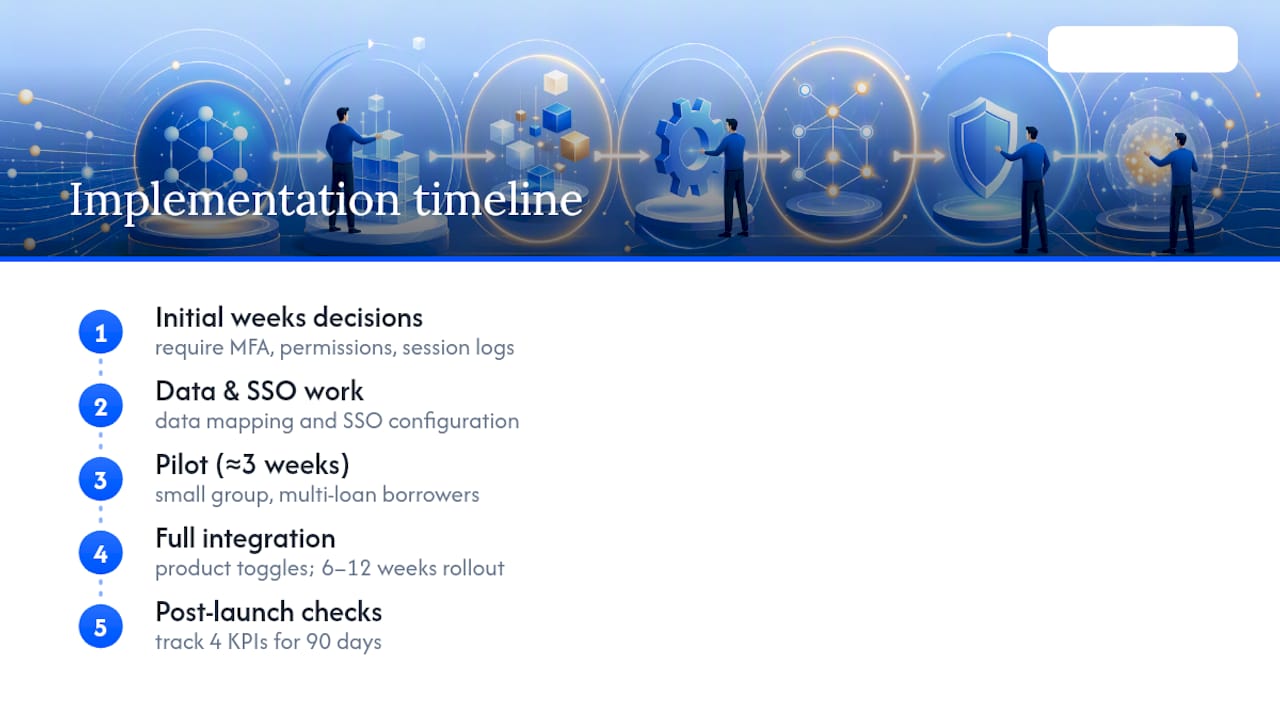
Pro Tip: Track four numbers before and after launch: call volume, document turnaround time, portal adoption rate, and time to reconcile payments. If those four don't move within 90 days, the configuration needs attention, not more borrower outreach.
Multi-Language Support: Don't Treat It as an Afterthought
Multi-language support is one of the most overlooked borrower portal features, and one of the most consequential for adoption in diverse markets. A portal that only speaks English locks out borrowers who would otherwise self-serve, pushing them right back into the call queue you built the portal to relieve.
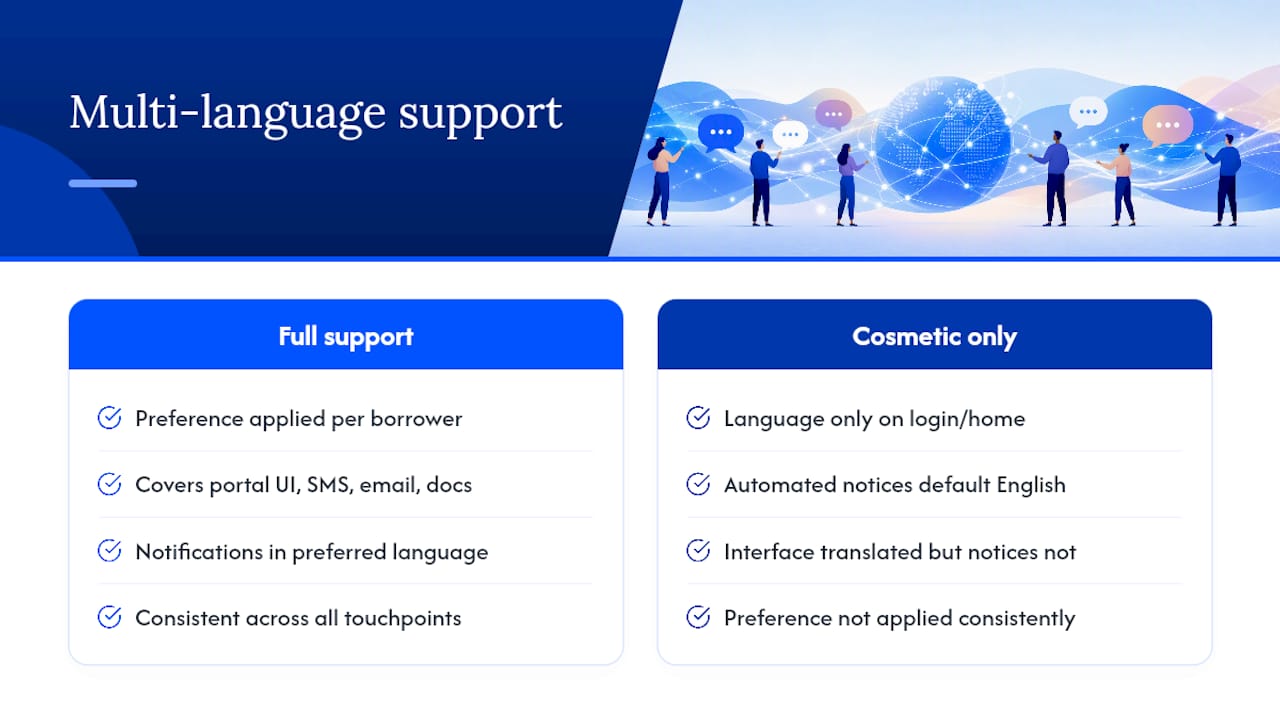
The functional bar is higher than a translated homepage. Payment confirmations, document request language, and automated notifications all need to render correctly in the borrower's preferred language, not just the login screen. If notifications default back to English regardless of the borrower's language setting, the feature is cosmetic.
Ask vendors directly whether language preference is set once per borrower and applied consistently across every touchpoint, portal UI, SMS alerts, email notices, and generated documents. Some platforms handle the interface translation but leave automated notices in a single default language, which defeats the purpose for a Spanish-speaking or Mandarin-speaking borrower trying to understand a payment due notice.
For servicing teams operating in markets with meaningful non-English-speaking populations, this feature affects the same metrics as everything else on this list: call volume, document turnaround, and borrower satisfaction. Treat it as a functional requirement during procurement, not a checkbox you address after launch.
Support and Onboarding: Getting Borrowers to Actually Use the Portal
A portal nobody logs into delivers zero savings, and the difference between high and low adoption usually comes down to how borrowers are onboarded, not how good the interface is.
The strongest onboarding flows start at closing, not weeks later in a follow-up email nobody opens. Borrowers who create their portal login as part of the closing process adopt at far higher rates than those who receive a separate "activate your account" email after the fact. Vendor Invite APIs make this easier by letting your team trigger account provisioning automatically at the right workflow step, instead of a manual batch process someone has to remember to run.
Ongoing support matters just as much as the initial setup. Borrowers need a clear path when something goes wrong, a payment fails, a document won't upload, a password reset loop breaks, and that path should live inside the portal itself through in-app messaging, not force a phone call back to the exact call center you were trying to offload. Look for portals with built-in help content, contextual tooltips for less obvious features like AutoPay enrollment, and a support escalation path your staff can see and respond to directly.
Author Perspective: The Portal Is Infrastructure, Not a Widget
Every deployment I have seen fail traces back to the same root cause: someone treated the borrower portal as a marketing feature instead of servicing infrastructure. The portals that actually reduce call volume and speed up document turnaround are the ones built on real integration work, not a pretty login screen with a payment button bolted on.
My advice for scope: start narrow. Launch with real-time account visibility, payments, and document upload tied cleanly to your LMS. Add messaging, portfolio dashboards, and expanded notification logic over the following year once the core data flow is proven under real volume.
— Omar Khamisa
How 1 Solution Approaches Borrower Portals
Most servicing teams end up stitching together a separate portal vendor, a separate LOS, and a separate CRM, then spending months reconciling data between all three. One mortgage software provider takes the approach of running the borrower POS portal, LOS, CRM, and payment tools on a single connected platform, so a payment or document update doesn't have to sync across systems because it never left one in the first place.
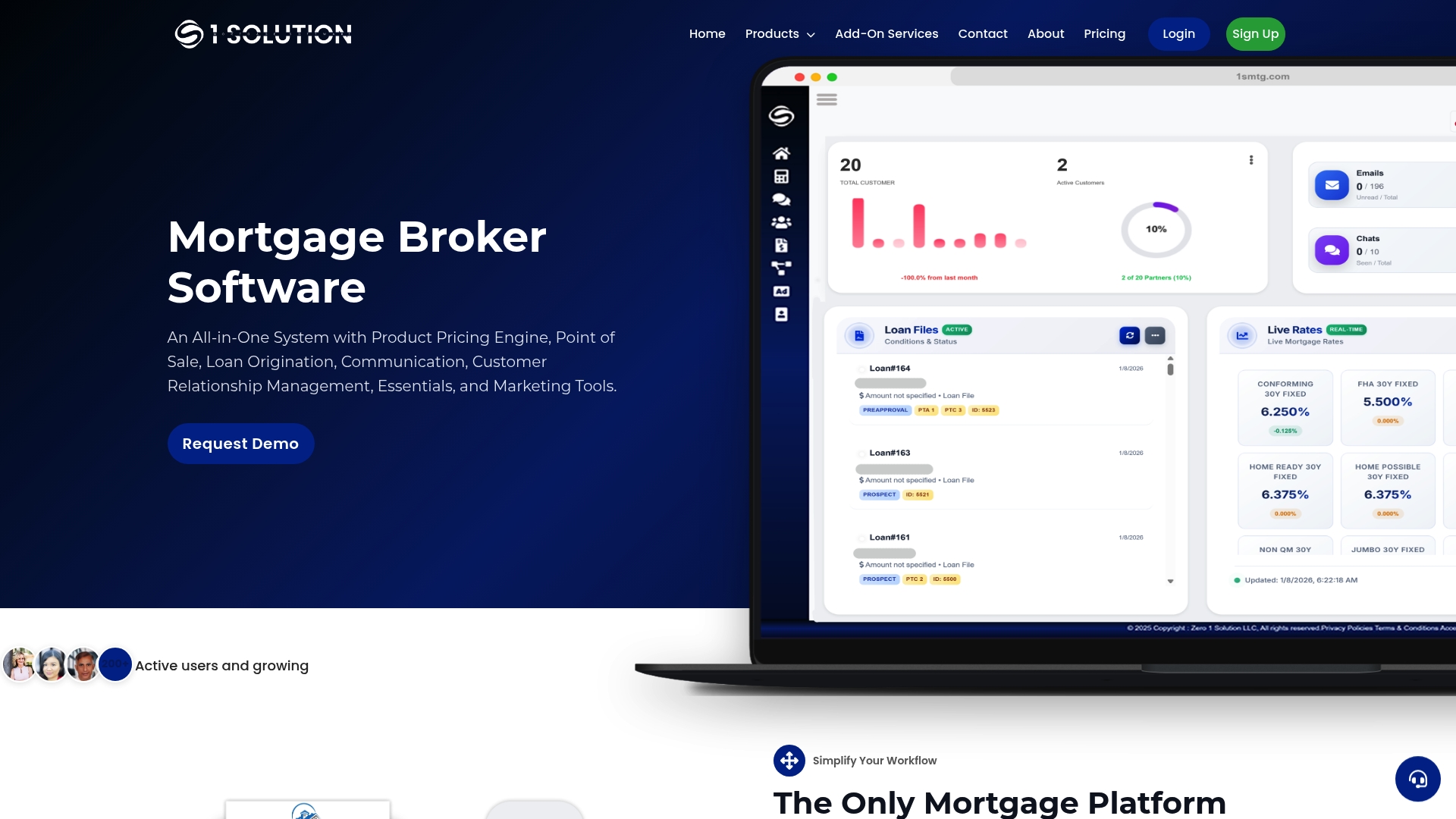
That single-source structure matters most for independent brokers who don't have a dedicated integration team to babysit API connections between vendors. Configurable workflows mean you can adjust what borrowers see by loan product without waiting on a vendor's development queue, and reconciliation happens inside the same system that handled origination. If you're evaluating borrower portal features against the checklist above, see how 1 Solution Mortgage Software handles them firsthand. Visit the platform overview or request a demo to walk through your own data mapping and rollout timeline with our team.
Sources
For deeper detail on integration points and workflow design, see our guides on loan origination systems, mortgage automation tools, and AI-assisted document workflows that commonly pair with borrower-facing systems.
- Lower Loan Servicing Costs with Borrower Self-Service Portals
- Customer portal overview | LoanPro
- How borrower portals improve borrower communication and loan management
FAQ
What Is a Borrower Portal?
A borrower portal is a self-service digital interface that gives borrowers direct access to their loan account, including balances, payment history, documents, and messaging, tied to the same servicing record your staff uses.
What Are the Key Features of a Loan Portal?
The core features include real-time account visibility, payment and AutoPay management, secure document upload and statement access, automated notifications, in-portal messaging, and integration with your LMS, LOS, and payment engines.
What Are the 5 C's of Lending?
The 5 C's of lending, character, capacity, capital, collateral, and conditions, are underwriting criteria used to assess a borrower's creditworthiness before a loan is approved; they describe the lending decision, not portal features.
What Are the Elements of a Loan Application?
A loan application typically covers borrower identification, income and employment verification, asset and liability disclosure, credit history, loan purpose, and collateral or property details, though exact requirements vary by loan type and lender.
How Long Does It Take to Deploy a Borrower Portal?
A basic pilot with clean data can often launch in about three weeks, while full integration with your LMS, LOS, and payment systems, plus expanded product configuration, typically takes six to twelve weeks.
Does 1 Solution Mortgage Software Include a Borrower Portal?
Yes. 1 Solution Mortgage Software includes a configurable borrower POS portal built into the same platform as its LOS, CRM, and payment tools, so borrower data stays synced across the system by design.