
Process documentation gives startups a way to scale without breaking, because it moves critical knowledge out of one person's head and into a system the whole team can run. Atlassian's work management research shows documentation reduces operational risk sharply enough that a simple ICU checklist prevented infections and saved lives in a single year. Salesforce's Health Care & Life Sciences findings, reported through Inc., tie centralized knowledge to improved productivity and reduced IT expenses. At 1 Solution Mortgage Software, we built our platform around this same principle: brokers who document pricing, compliance, and CRM workflows scale teams without losing control.
- Pick one repeated task you did this week.
- Write down the trigger, the steps, and who owns it.
- Save it somewhere your team can find it in under a minute.
Pro Tip: Set a 15-minute timer and document the one process that would hurt the most if you forgot how it worked tomorrow.
Key Takeaways
Process documentation reduces key-person risk, cuts onboarding time, and lets startups scale operations without proportionally scaling chaos.
| Point | Details |
|---|---|
| Start with high-frequency tasks | Document onboarding, billing, and top support fixes first for the fastest payoff. |
| Use the full field set | Include trigger, owner, inputs, steps, decisions, outputs, systems, and evidence in every document. |
| Match tools to risk | Use wikis like Notion or Confluence for low-risk knowledge, workflow tools for compliance-sensitive processes. |
| Assign real ownership | Every document needs one accountable owner and a set review cadence. |
| Track measurable outcomes | Monitor onboarding time, error rate, and cycle time to prove documentation is working. |
Table of Contents
- Why Process Documentation Matters for Startup Growth
- What Should a Good Process Document Include?
- How Do You Start Documenting Processes in a Startup?
- Which Tools and Formats Work Best for Startup Documentation?
- How Do You Keep Documentation Current and Measure Its Impact?
- What Documentation Mistakes Should Startups Avoid?
- Startup Process Documentation Checklist
- Frequently Asked Questions
- Sources
Why Process Documentation Matters for Startup Growth
The role of process documentation in startups comes down to solving problems that compound as headcount grows: onboarding bottlenecks, knowledge that walks out the door with a departing employee, repeated mistakes, and audits nobody can prepare for on short notice. Adi Klevit points to four recurring startup failures: scaling faster than training can keep up, constant reorganization, operational bottlenecks, and knowledge loss during staff transitions. Documentation addresses all four at once.
- Faster onboarding. New hires reference a written process instead of shadowing someone for two weeks.
- Fewer errors. Steps get followed the same way regardless of who's doing them.
- Lower key-person risk. Atlassian's risk management research notes that key-person risk disappears once knowledge moves out of individual memory and into shared documents.
- Audit readiness. Compliance-heavy startups can produce evidence on demand instead of scrambling.
A startup that documented its client onboarding sequence cut new-hire ramp time roughly in half, simply because reps stopped asking the same five questions to whoever happened to be free.
Salesforce's findings back this pattern at scale: teams that centralize documentation report higher productivity and reduced IT overhead compared to teams relying on scattered notes and tribal knowledge.
What Should a Good Process Document Include?
A process document that actually gets used has structure, not just prose. Process the essential fields as trigger, owner, inputs, steps, decisions, outputs, systems, evidence, and update rules. Skip any of these and the document turns into a vague description nobody can execute from.
- Trigger. What starts the process, so people know when to run it.
- Owner. Who's accountable if it breaks or goes stale.
- Inputs. What information or materials are needed before starting.
- Step-by-step actions. The literal sequence, not a summary of it.
- Decisions and branches. What changes the path (a declined application, a missing document).
- Outputs. What "done" looks like.
- Systems and tools. Which software touches each step.
- Evidence. Proof the step happened, useful for audits and troubleshooting.
- Update rules. When and how the document gets revised.
Experts on workflow documentation stress that steps alone aren't enough. A process needs decisions, evidence, and update rules built in so it stays repeatable and auditable months later.
Pro Tip: Use screenshots or a quick flow map for anything with more than three decision branches. Reserve full executable workflows for processes where a missed step creates compliance exposure.
How Do You Start Documenting Processes in a Startup?
Founders don't need a documentation department. They need a sequence that captures the highest-value processes first and expands from there.
- Days 1 to 30: Capture the basics. Document your highest-frequency, lowest-variance processes: customer onboarding, billing, and your top five recurring support fixes. Use a simple template and assign one owner per document. Notion's guidance for startups recommends exactly this: start with what repeats often and varies little, because that's where documentation pays off fastest.
- Days 31 to 60: Connect the handoffs. Expand into cross-functional processes, the ones where work moves between sales, operations, and support. Set up one central repository instead of letting documents scatter across drives and chat threads. Run your first review cycle to catch what's already outdated.
- Days 61 to 90: Stabilize and measure. Decide which processes are stable enough to automate. Document first, stabilize second, automate third. Automating a broken process just locks in the inefficiency. Assign ongoing owners and lock in a review cadence.
Prioritize using a simple formula: value times frequency times risk. A process that's high-value, happens daily, and carries compliance risk beats a process that happens once a quarter, every time.
Pro Tip: Record yourself performing the task on screen, then turn the recording into written steps afterward. It's faster than writing from memory, and you'll catch steps you'd otherwise forget to mention.
Which Tools and Formats Work Best for Startup Documentation?
The right format depends on how risky and how repeatable the process is, not on which tool looks the most impressive in a demo.
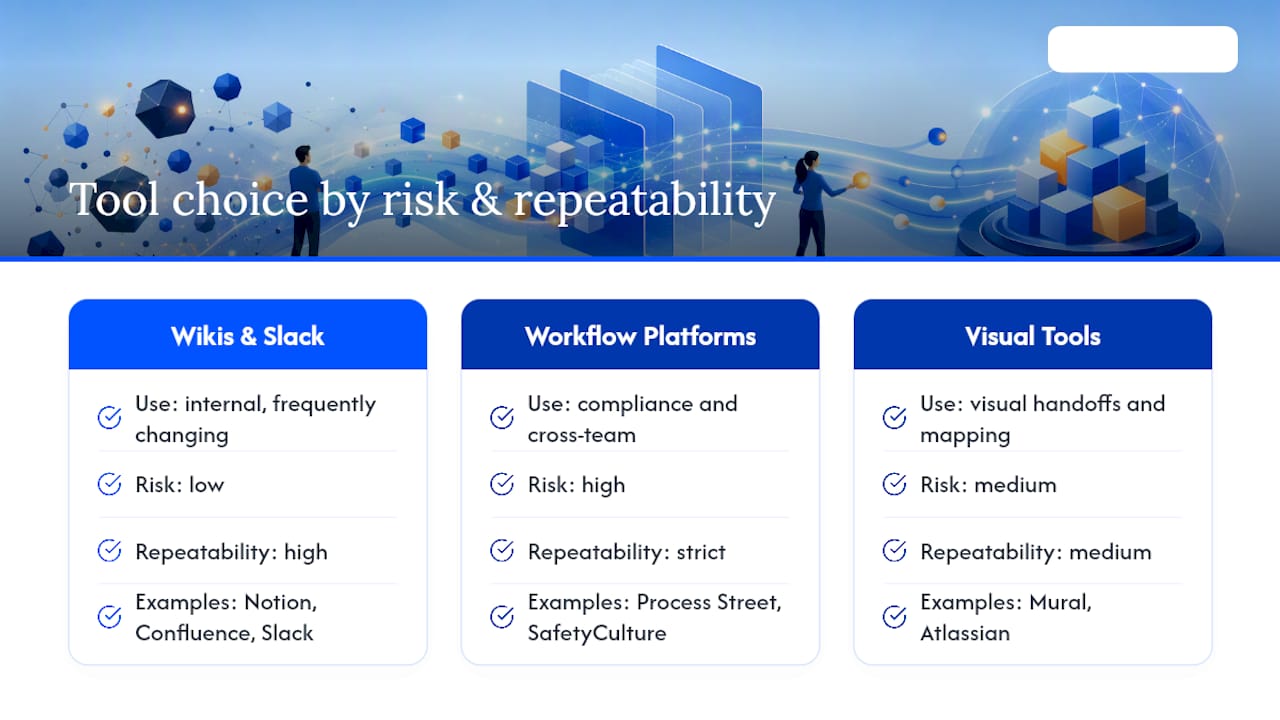
A lightweight wiki works fine for internal knowledge that changes often and carries low risk. Notion and Confluence handle this well, and Slack channels serve as a quick reference layer for day-to-day questions. Slack's own guidance recommends centralized knowledge repositories and digital adoption platforms to stop teams from losing critical knowledge and repeating the same training over and over.
Compliance-sensitive or cross-team processes need something sturdier. Process Street turns documentation into an executable workflow with built-in accountability, while SafetyCulture captures digital checklists and evidence in real time, which matters when you need proof a step actually happened. For visual, cross-functional handoffs, Mural supports team mapping and shared decision-making better than a wall of text ever will. Atlassian's broader work management tools round out the stack for teams already living in Jira or Confluence.
Pro Tip: Match the tool to the risk. A missed step in a marketing checklist is annoying. A missed step in a compliance workflow is a liability, and it deserves a workflow platform, not a static doc.
How Do You Keep Documentation Current and Measure Its Impact?
Documentation without an owner decays fast. Assign a document owner responsible for accuracy and a reviewer who checks it on a set cadence, more frequent for high-risk processes, closer to annual for stable low-risk ones. Microsoft recommends establishing a central repository and clear stakeholder ownership as the first real step toward organizational resilience, and it holds up in practice: one owned document beats five unowned copies scattered across drives and email threads.
- Keep one single source of truth. Kill duplicate PDFs the moment you find them.
- Set review reminders tied to your calendar, not your memory.
- Track version history so nobody works from an outdated copy.
To know if documentation is working, track a short list of metrics:
- Onboarding time for new hires.
- Mean time to competency on a given task.
- Error or exception rate on documented processes.
- Number of ad-hoc interruptions asking "how do I do this?"
- Process cycle time from start to finish.
- Incidents traceable to missing or outdated documentation.
Expect early wins by day 30, measurable onboarding gains by day 60, and a clearer error-rate trend by day 90.
What Documentation Mistakes Should Startups Avoid?
Documentation becomes technical debt fast when founders overcorrect. Watch for these:
- Over-documentation. Writing a five-page SOP for a task that takes two minutes wastes everyone's time. Keep it lean.
- Stale docs. Nobody updates what nobody owns. Assign an owner and a reminder, always.
- Lack of buy-in. Mandates fail. Small visible wins, like cutting onboarding time in half, build adoption faster than a policy memo.
- Documenting the wrong things. Use the value times frequency times risk rule instead of guessing.
- Unreadable formats. A wall of text nobody opens is worse than no document at all. Use checklists and screenshots.
Pro Tip: Track whether documents actually get opened. Page views, search queries inside your wiki, and a quick Slack poll tell you more about adoption than any policy ever will.
Startup Process Documentation Checklist
Copy this list and start today:
- Identify your top five recurring processes.
- Record yourself or a teammate performing each one.
- Write a short SOP: title, goal, owner, steps, troubleshooting notes, last-updated date.
- Assign one owner per document.
- Upload everything to a single central repository.
- Set a recurring review reminder.
- In a small startup, the person doing the work should usually own its documentation.
- Founders should own cross-functional processes until a dedicated ops hire takes over.
- Revisit ownership every time the team doubles in size.
A Founder's Take on Why This Isn't Bureaucracy
Twenty years watching mortgage operations fail and succeed taught me one thing: teams don't lose to competitors, they lose to their own tribal knowledge walking out the door. Documentation isn't overhead. It's the difference between a startup that can hire ten people next quarter and one that can't function if two people take vacation at once. Start with one process. Iterate. Don't wait for it to be perfect.
Frequently Asked Questions
What is the role of process documentation in startups? It captures how work actually gets done so a startup can onboard faster, cut repeated errors, and avoid depending on any one person's memory to keep operations running.
How much process documentation does an early-stage startup actually need? Start with your five most frequent, lowest-variance processes. Expanding beyond that before you've stabilized the basics usually creates more maintenance burden than value.
What's the difference between a wiki and a workflow tool for documentation? A wiki like Notion or Confluence stores reference knowledge people read. A workflow tool like Process Street turns steps into an executable, trackable process, better suited to compliance-heavy work.
How often should startup process documents be reviewed? High-risk or compliance-related processes deserve review every 30 to 60 days. Stable, low-risk processes can go closer to an annual cycle.
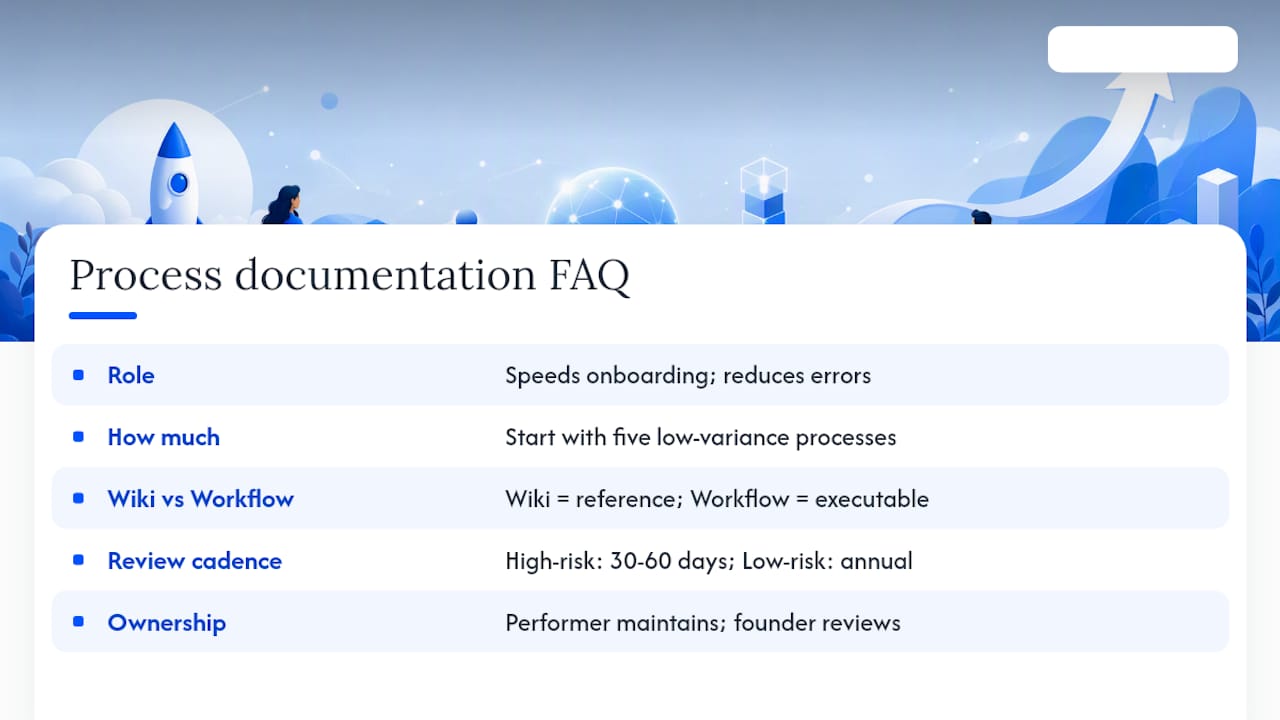
Who should own process documentation in a small team? Whoever performs the task should usually write and maintain it, with a founder or team lead reviewing cross-functional processes until the company is large enough to hire dedicated operations staff.
Sources
- Process documentation (Atlassian)
- 5 ways to ensure business process documentation stays up to date (Inc.)
- Process
- Why process documentation is crucial to your business (Microsoft)
- What Is Process Documentation, and Why Do I Need It? (Slack)
- Yes, your startup needs process documentation. Here's how to do it (Notion)
Mortgage brokers looking to build documented, scalable operations can explore the 1 Solution Mortgage Software platform for tools built around this same approach.