
Yes — dedicated mortgage software training is a business necessity for any U.S. brokerage implementing a modern LOS, CRM, or pricing engine. The returns are concrete: fewer compliance violations, faster time-to-proficiency, and measurable gains in loan throughput per staff member.
- Compliance and audit risk: Consistent, structured training reduces audit exposure and prevents the data-handling errors that trigger regulatory findings in U.S. mortgage operations.
- Operational improvement: Teams that complete role-based training reach full productivity faster, make fewer manual errors, and process more loans per FTE than untrained counterparts.
Treating software training as a one-time onboarding expense is one of the most expensive mistakes a brokerage can make. Platforms update, regulations shift, and untrained staff revert to spreadsheets and unencrypted email — creating data silos and compliance exposure that cost far more than a refresher course.
Table of Contents
- What should dedicated mortgage software training cover?
- How does dedicated training improve compliance, operations, and revenue?
- What are the best practices for designing effective mortgage software training?
- What timelines and costs should you budget for dedicated training?
- How do you measure training ROI and which KPIs matter most?
- What leadership mistakes derail mortgage software training programs?
- Step-by-step checklist for implementing training at your brokerage
- Key Takeaways
- Why most brokerages underestimate what training actually does
- 1 Solution Mortgage Software supports your training from day one
- Useful sources and further reading
What should dedicated mortgage software training cover?
A well-scoped training program maps to every role in your brokerage, not just loan officers. Here is the module structure that covers the full platform:
Role-based tracks:
- Admin and client services: pipeline visibility, task management, borrower portal navigation, document requests
- Loan officers and brokers: LOS workflows, POS borrower portal, CRM integrations, rate comparison, proposal and pre-approval generation
- Underwriters: role-tailored LOS workflows, condition management, eFolder handling, decision documentation
- Compliance and operations: audit trail management, secure data handling, e-sign and closing workflows, RESPA/TILA documentation
- IT and support: user provisioning, integration testing, security settings, escalation paths
Core topic areas every track must include:
- LOS and POS workflow execution from application to close
- Pricing engine (PPE) usage and rate lock procedures
- CRM pipeline management and automated follow-up
- Reporting and dashboard interpretation for operational decisions
- Compliance documentation and data security protocols
Pre-implementation familiarization is non-negotiable. Give your team access to documentation, video libraries, and sandbox environments before go-live. Teams that arrive at launch day already familiar with core navigation reach full productivity significantly faster than those encountering the platform cold. For practical guidance on setting up your platform before training begins, the 1 Solution blog covers the pre-launch steps in detail.
How does dedicated training improve compliance, operations, and revenue?
Training changes the numbers brokerages actually measure. Here is how each benefit category plays out:
Compliance risk reduction

Consistent training across all staff means every team member handles borrower data, audit trails, and disclosure documentation the same way. Fewer individual interpretations of platform workflows means fewer exceptions during regulatory examinations. Mortgage regulatory compliance is not a set-it-and-forget-it function — it depends on staff executing the right steps in the right system fields, every time.
Operational efficiency
Trained teams eliminate the manual workarounds that quietly destroy throughput. When staff know how to use reporting and dashboard features, they make faster, data-driven decisions rather than chasing information across disconnected tools. Training on reporting features directly links to better operational decisions and improved client satisfaction.
KPIs to monitor after training:
- Time-per-loan (application to clear-to-close)
- Touches-per-file (manual interventions per loan)
- Error and exception rate per 100 loans
- Average days-to-close
- Loan throughput per FTE per month
- Client satisfaction score (NPS or CSAT)
- Audit findings count per quarter
Illustrative ROI example: A 10-person brokerage that reduces average days-to-close and cuts per-file error touches can realistically process additional loans per month without adding headcount. At an average net revenue per closed loan, that throughput gain pays for a full training program within the first quarter.
What are the best practices for designing effective mortgage software training?
The brokerages that get the most from their platforms treat training as an ongoing operational function, not a launch-week event.
- Blended formats work best. Combine live role-based workshops with sandbox practice, microlearning video libraries, and on-demand documentation. Phased, structured rollouts prevent operational disruption and let teams absorb features without being overwhelmed.
- Appoint internal super-users. Designate one or two staff members per team as platform champions. They master advanced features, answer day-to-day questions, and reduce help-desk dependency. This internal support network shortens resolution times and keeps adoption high between formal training sessions.
- Certify, don't just train. Gamified assessments, badges, and certification create auditable evidence of competency — useful for both internal governance and regulatory examinations.
- Schedule refreshers on a cadence. Quarterly mini-sessions covering platform updates and regulatory changes outperform annual retraining. Ongoing refresher courses are more important than initial onboarding precisely because both the software and the rules keep changing.
Pro Tip: Roll out features in phases rather than all at once. Start with core LOS and pipeline workflows in week one, add CRM automation in week three, and introduce advanced reporting and compliance dashboards in week six. Teams absorb each layer before the next arrives.
For a deeper look at staff training roles and responsibilities inside a brokerage, the 1 Solution blog breaks down how to structure ownership.
What timelines and costs should you budget for dedicated training?
Training duration and cost vary by team size, platform complexity, and delivery format. Training duration and cost vary by team size, platform complexity, and delivery format, ranging from short pilots for small teams to extended phased rollouts and refresher training for larger organizations.
Primary cost drivers:
- Number of distinct roles requiring separate curriculum tracks
- Delivery mode: in-person instructor-led costs more per seat than virtual or self-paced
- Custom curriculum versus off-the-shelf vendor modules
- Sandbox environment setup and coach time
- Certification and competency testing infrastructure
Hidden costs to plan for: lost productivity during training windows (typically 20–40% of a staff member's week during active sessions), change-management support if resistance is high, and the ongoing refresher budget that most initial proposals omit entirely. Mortgage software rollout support from your vendor can offset some of these costs if negotiated upfront.
How do you measure training ROI and which KPIs matter most?
Measurement starts before training, not after. Establish baselines on your priority KPIs the week before training begins.
Priority KPIs to track:
- Time-per-loan and average days-to-close
- Error and exception rate per 100 loans
- Loan throughput per FTE per month
- Client satisfaction (NPS or CSAT)
- Audit findings count per quarter
Simple ROI formula:
- Calculate time saved per loan after training (in hours per FTE)
- Multiply by average fully-loaded hourly cost per FTE
- Add error-reduction savings (cost per error x reduction in error count)
- Divide total savings by total training cost
Measurement checkpoints:
- 30–90 days: early adoption signals — are staff using the platform or reverting to workarounds?
- 3–6 months: operational KPI movement — time-per-loan, error rates, throughput
- 12 months: full ROI picture including compliance outcomes and client satisfaction trends
What leadership mistakes derail mortgage software training programs?
Most failed rollouts trace back to a small set of avoidable decisions.
- Treating training as one-time onboarding. Software updates and regulatory changes make this the single most costly assumption. Budget for refreshers from day one.
- Skipping pre-familiarization. Teams that encounter the platform cold on launch day lose days of productivity and develop workarounds that persist for months.
- Not appointing a super-user. Without an internal champion, every question becomes a vendor support ticket and adoption stalls.
- Under-budgeting for change management. Resistance to new workflows is real, especially when staff have used legacy systems for years. A phased rollout with clear communication reduces friction significantly.
The most dangerous outcome of under-training is not slow adoption — it is staff reverting to spreadsheets and unencrypted email. Those workarounds create data silos and compliance exposure that a regulatory examination will find. Training is not a cost center; it is a risk-management function.
Governance matters too. Assign clear ownership of training KPIs, define vendor success SLAs at contract signing, and require documented competency checks before staff access live loan files.
Step-by-step checklist for implementing training at your brokerage
Pre-launch:
- Align stakeholders on training goals and assign a training owner
- Inventory current workflows and identify the manual steps the platform will replace
- Measure baseline KPIs (days-to-close, error rate, throughput per FTE)
- Distribute pre-familiarization materials and sandbox access at least two weeks before go-live
- Confirm role-based curriculum tracks with your vendor or training provider
Launch:
- Run role-based live sessions in order of operational priority (LOS first, then CRM, then reporting)
- Certify super-users before general staff sessions begin
- Use live shadowing for the first two weeks of production use
- Update baseline KPI measurements at end of week two
Post-launch:
- Schedule quarterly refresher sessions covering platform updates and regulatory changes
- Run competency verification checks at 30 and 90 days
- Establish a monthly feedback loop with your vendor's customer success team
- Review KPIs monthly for the first six months; adjust training focus based on where errors cluster
The mortgage compliance setup checklist from 1 Solution pairs well with this implementation sequence for brokerages building compliance controls alongside their training program.
Key Takeaways
Dedicated mortgage software training is a compliance and operational investment that pays back within the first quarter when measured against time-per-loan, error rates, and audit exposure.
| Point | Details |
|---|---|
| Training is risk management | Consistent platform training reduces audit findings and prevents the data-handling errors that trigger regulatory violations. |
| Pre-familiarization accelerates adoption | Giving teams sandbox access and documentation before go-live shortens the learning curve and speeds value realization. |
| Refreshers outperform one-time onboarding | Quarterly sessions covering platform updates and regulatory changes maintain compliance and performance over time. |
| Measure ROI from day one | Track time-per-loan, error rate, and throughput per FTE before training begins so you have a real baseline for comparison. |
| 1 Solution Mortgage Software | Built for independent brokers, 1 Solution's platform supports role-based training with integrated LOS, CRM, compliance, and reporting tools. |
Why most brokerages underestimate what training actually does
The conventional wisdom treats training as a technology problem: get staff to click the right buttons and move on. That framing misses the real value entirely.
Training is where your platform investment either compounds or stalls. A brokerage that deploys a full LOS/CRM/PPE stack and then skips structured training does not get 80% of the benefit — it often gets less than half, because staff default to the habits they already have. The workarounds they build in the first 60 days become entrenched. Those workarounds are where compliance risk lives.
What I have seen across 20-plus years in mortgage operations is that the brokerages with the lowest error rates and the cleanest audit trails are not necessarily running the most sophisticated platforms. They are the ones where every team member, from the processor to the loan officer, knows exactly what to do in the system and why. That consistency comes from training designed around real workflows, not vendor demos.
The other thing most leaders underestimate is the super-user model. One or two internal champions who genuinely master the platform create a multiplier effect across the whole team. They answer questions in real time, they catch workflow drift before it becomes a compliance issue, and they reduce the vendor support load so your team stays focused on loans. That is not a nice organizational touch. It is the difference between a platform that gets used and one that gets worked around.
1 Solution Mortgage Software supports your training from day one
Independent brokerages that want the benefits of dedicated mortgage software training without stitching together a dozen separate tools have a direct path forward with 1 Solution Mortgage Software. The platform was built from real mortgage operations experience, which means the training support is designed around how brokers actually work — not how a software vendor thinks they should.
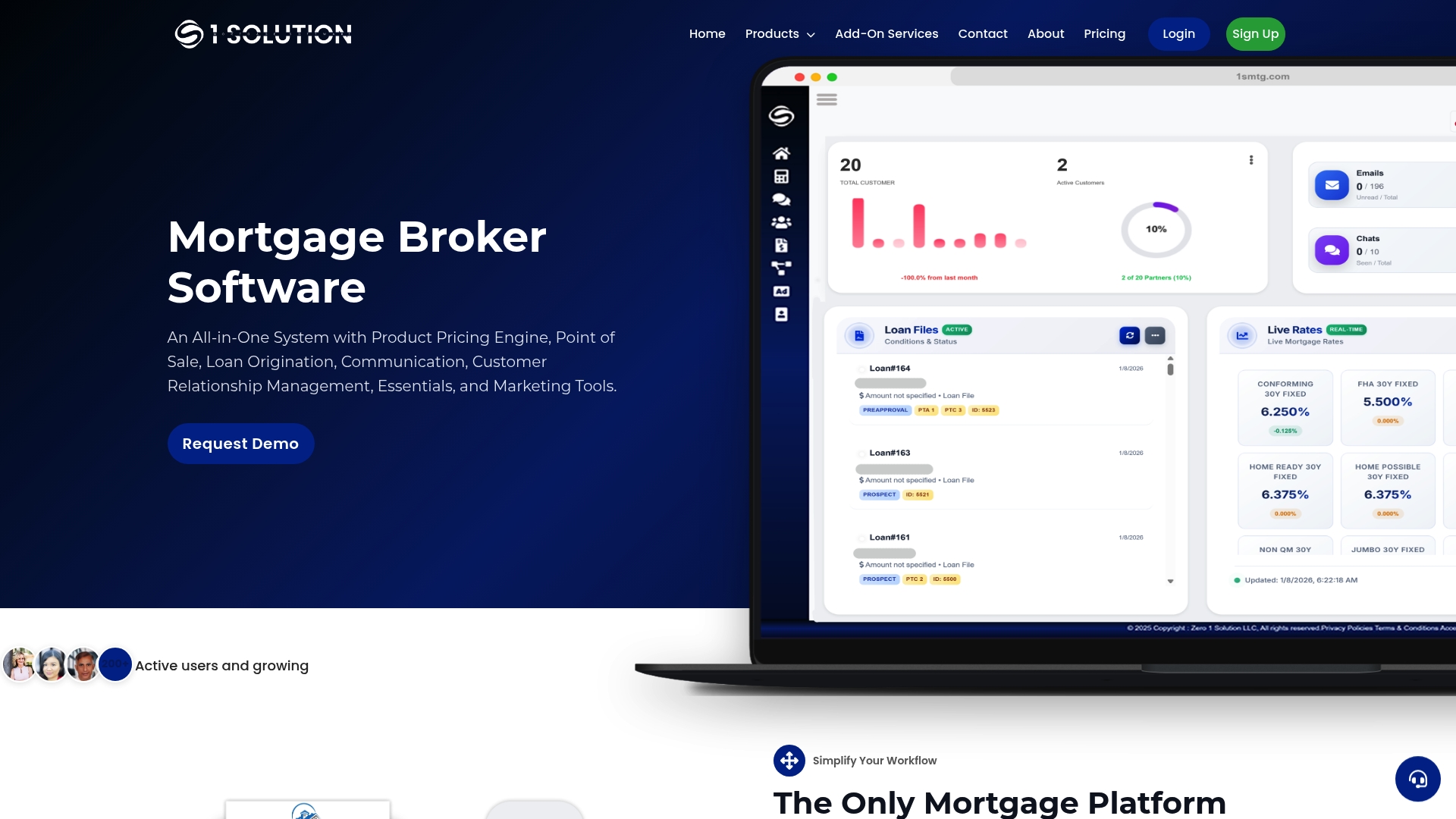
1 Solution provides pre-familiarization materials, role-based curriculum guidance, super-user coaching, and sandbox access so your team arrives at go-live ready to produce. The integrated LOS, POS, CRM, pricing engine, compliance tools, and reporting dashboards mean your training program covers one connected system rather than five separate ones. Every feature your staff learns in training maps directly to a live workflow they will use on real loans.
Ready to see how the platform supports your team's training and adoption? Visit 1 Solution Mortgage Software to request a demo and walk through the training resources available to your brokerage.
Useful sources and further reading
1 Solution blog posts:
- Mortgage Regulatory Compliance Explained for Brokers
- The Role of Staff Training in Mortgage Companies
- How Loan Officers Get Trained on Software in 2026
- Mortgage Broker Compliance Management Guide 2026
- Mortgage Compliance Setup Checklist for 2026
External authority resources:
- Netskill — Mortgage Technology Platforms Training: backs the compliance risk reduction and certification claims in the benefits and best practices sections
- Capacity — Best Practices for Implementing Mortgage Loan Origination Software: source for pre-familiarization, implementation team structure, and vendor engagement recommendations
- Neutech — 4 Best Practices for Using Mortgage Company Software Effectively: supports the refresher cadence, phased rollout, and reporting-feature training claims throughout the article
This article is general informational guidance for U.S. mortgage brokerages, not legal or compliance advice. Confirm current regulatory requirements with CFPB resources or a qualified compliance professional for your specific situation.